
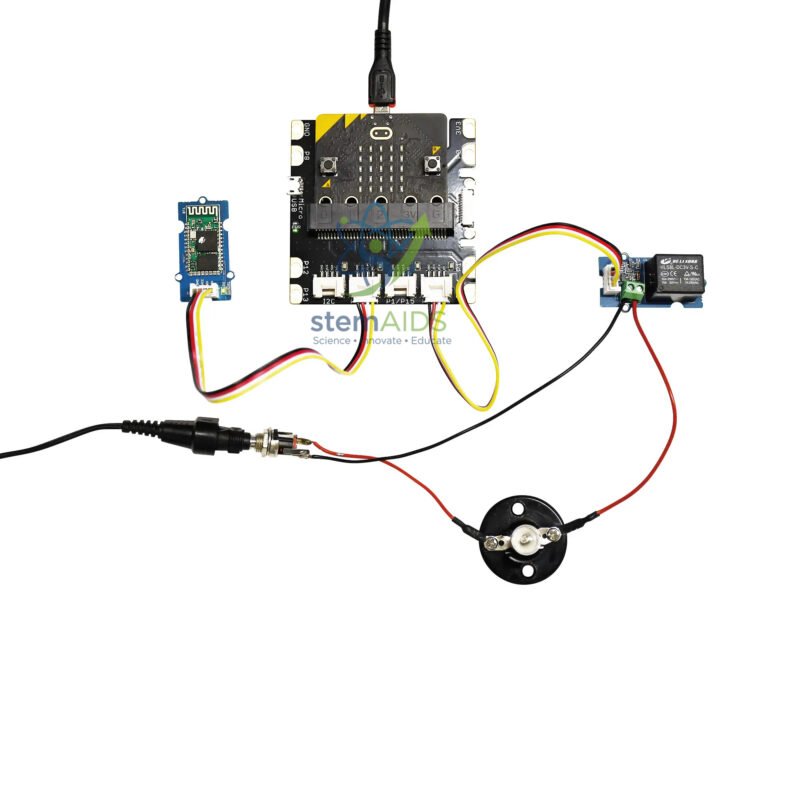
Quick Answer: The Micro:Bit Smart Bulb Kit Without Micro:Bit Interface is a home-automation project in which a micro:bit program switches a small lamp through a relay, so students build and control their own model smart bulb. The interface board that links the micro:bit to the modules is not included.
What Makes a Bulb Smart
A smart bulb is an ordinary lamp with a controller and a switch built in. The controller receives a command from a button, a timer, a sensor or a phone, and the switch turns the light on or off. In this kit the micro:bit is the controller and a relay is the switch: a small current from the micro:bit energises the relay coil, which pulls a contact closed and completes the lamp circuit. The audible click of the relay makes the idea of a separate control circuit and load circuit very concrete.
Connected-bulb kits of this kind are designed for wireless control, typically from a phone app over Bluetooth, so students can design the screen that operates their light as well as the code behind it. That brings in human-machine interface design: which buttons the user needs, what feedback they see and what happens if the connection drops. Confirm the wireless module and app approach used by this kit.
Without interface means the board that connects the micro:bit to the relay and wireless modules is not part of this listing, and schools use their existing micro:bit interface. Kits of this type use a small low-voltage lamp in a screw holder. Relay modules can carry high contact ratings, but classroom projects must never switch mains electricity.
Specifications
| Item | Smart-bulb home-automation project kit for micro:bit |
| Switching | Lamp switched by a relay under program control |
| Control options | Buttons, timers, sensors or a phone app over a wireless link |
| Lamp | Small low-voltage project lamp, typical of such kits |
| Interface board | Not included |
| Wireless module and exact parts | Confirm at enquiry |
Care & Handling
- Use only the lamp and battery supply intended for the kit, and never connect the relay to mains wiring.
- Let the lamp cool before touching or unscrewing it.
- Pair each kit with one phone at a time and rename devices so groups do not control each other’s lamps.
- Disconnect the power before changing connections on the relay.
Project Ideas
- Phone-controlled lamp with on, off and timer buttons
- Night light that switches on by itself when the light level falls
- Occupancy model that turns the lamp off after a set time without activity
- Energy-saving comparison of timed, manual and sensor-controlled lighting
Why Choose LabEquip
Technology teachers covering home automation and the Internet of Things buy the smart-bulb kit so students can build a system they recognise from home. It reuses an existing interface such as the Micro:bit programming interface and sits in the STEM kits range; request class sets through the contact page.
Frequently Asked Questions
What does the relay do in the smart bulb kit?
The relay is an electrically operated switch. The micro:bit sends a small current to the relay coil, which closes a separate contact in the lamp circuit, keeping the control circuit and the lamp circuit apart.
Why can’t the micro:bit light the lamp directly?
A lamp needs more current than a micro:bit pin can supply safely. The relay lets a tiny control signal switch the larger current from the battery supply.
Can this kit control a real household bulb?
No. It is designed for a small low-voltage lamp. Mains electricity is dangerous and must never be connected to classroom project relays, even when the relay is marked with a high rating.
How is the lamp controlled from a phone?
Connected-bulb kits normally use a wireless link, often Bluetooth, and an app that sends on or off messages. The micro:bit program receives each message and switches the relay. The module and app method for this kit should be confirmed.
What does without interface mean for the smart bulb kit?
The board that joins the micro:bit to the relay and wireless modules is not included. Schools use a micro:bit interface they already own or order one separately.
Why does the relay click but the lamp stay off?
The control side is working but the lamp circuit is not. Check that the lamp is screwed in firmly, the battery is charged and the wires are on the correct relay terminals, usually common and normally open.
Last Updated: September 2026






Reviews
There are no reviews yet.