

In Stock
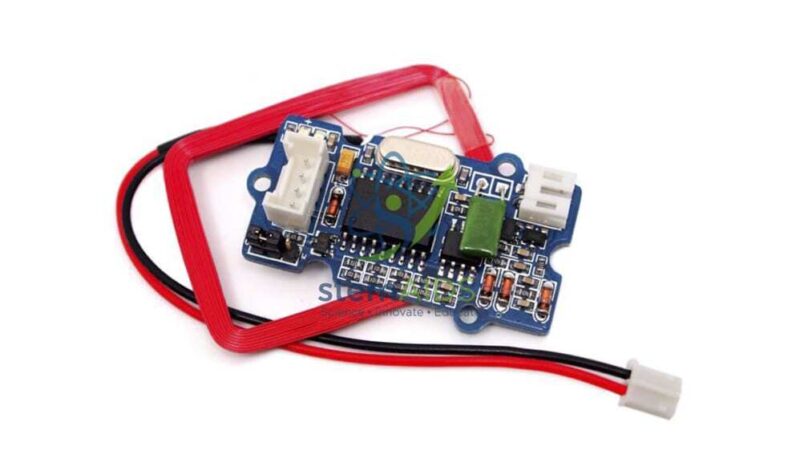
RFID Reader 125 kHz Grove
Quick Answer: The RFID Reader 125 kHz Grove is a 125 kHz RFID reader module, a low-frequency radio-frequency identification reader with an antenna coil and a Grove connector. It energises nearby 125 kHz tags, reads their identity numbers and passes them to a microcontroller over a serial link, so students can build access-control and logging projects.
What the Reader Module Does
The reader has two working parts: the antenna coil, which creates the 125 kHz field and picks up the tag’s reply, and the decoding circuit, which turns that reply into an ID number. Grove readers of this type usually send the number to the host board over a serial (UART) connection, and some also offer Wiegand output selected on the board, the format used by many commercial door controllers. Confirm the output modes and antenna arrangement for this listing when ordering.
Students then write the logic around the ID: compare it with a stored list, show a name on a display, move a servo latch or record the time. The reader itself makes no decision. This teaches a clean split between input hardware and program logic, and it introduces serial communication, since the code must collect a stream of characters and assemble them into one ID.
The module reads 125 kHz tags such as the EM4100-type cards and fobs widely used in education kits. It cannot read 13.56 MHz MIFARE or NFC cards, so tags must be chosen to match the reader.
Specifications
| Item | RFID reader module with antenna coil and Grove connector |
| Frequency | 125 kHz low-frequency RFID |
| Output to host | Serial data; Wiegand option on some versions |
| Compatible tags | 125 kHz read-only tags of the EM4100 type |
| Connection | Grove cable to a UART-capable port on a shield |
| Output modes and antenna format | Confirm at enquiry |
Set-Up and Care
- Keep the antenna coil away from metal surfaces and other coils, which weaken the field and shorten the read distance.
- Do not pull on the fine antenna lead if the coil is separate from the board.
- Power the reader from the host board supply as documented and never connect it to a higher voltage.
Applications
- Card-operated door or locker model with a servo latch
- Attendance register that logs tag IDs with times to a screen or file
- Library or equipment checkout system matching tags to items
- Lessons on serial communication, data parsing and lookup tables
Why Choose LabEquip
Schools running coding or electronics courses generally order the reader with a pack of 125 kHz RFID tags, giving each group several IDs to test. LabEquip supplies both through its STEM kits range. Share group numbers and host boards on the contact page for a matched set.
Frequently Asked Questions
Which tags does a 125 kHz reader work with?
It reads low-frequency 125 kHz tags, typically the EM4100 type supplied as cards, key fobs or discs. It cannot read 13.56 MHz tags such as MIFARE cards, NFC stickers or phones. Always match the tag frequency to the reader.
How does the microcontroller receive the tag ID?
In serial mode the reader sends the ID as a short sequence of bytes whenever a tag is presented. The program reads the bytes from the serial port, joins them into one number or string and compares it with a stored list.
Can the reader write to tags?
A 125 kHz reader of this kind only reads the fixed ID from each tag. Writing needs a writer and writable tags. For school projects reading is enough, because the program links each ID to a name or permission.
What limits the reading distance?
Distance depends on the antenna size, the tag size and nearby metal. Low-frequency RFID is a short-range technology, so tags are usually read at a few centimetres. Keeping the antenna flat and clear of metal gives the most consistent reads.
Can I use the reader with a micro:bit?
Arduino-type boards are the most common host. A micro:bit can also read serial data on its pins, but check the reader’s supply voltage requirement against what the micro:bit shield provides before trying it.
What is Wiegand output?
Wiegand is a simple two-wire format that many commercial access-control panels use to receive card numbers. Readers that offer it let students see how real door systems are wired, while serial mode is easier for classroom programming.
Last Updated: September 2026
You must be logged in to post a review.
Bestsellers


Sale

Sale

Sale
Sale


Reviews
There are no reviews yet.