

In Stock
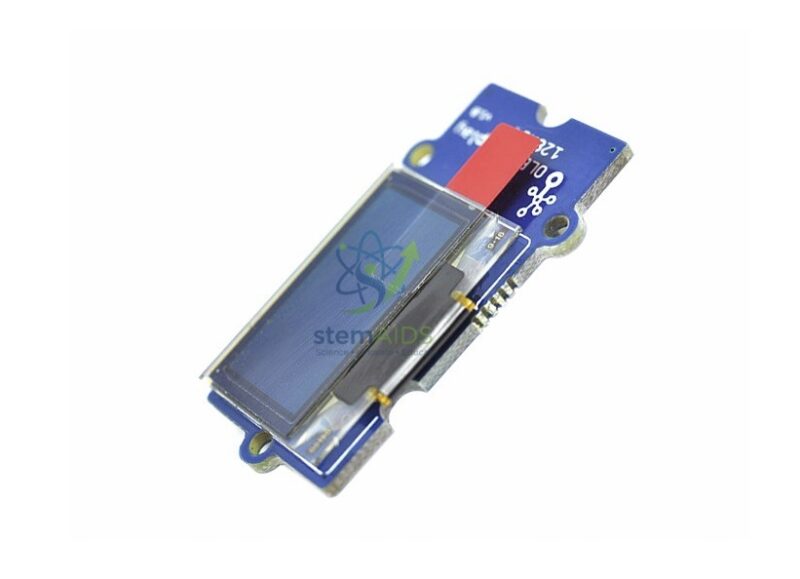
OLED Display 1.12″ Grove
₹856.00
Quick Answer: The Grove OLED display 1.12-inch is a small organic LED screen with a 1.12-inch diagonal, mounted on a Grove module. Each pixel produces its own light, so it shows sharp text, sensor readings and simple graphics from a microcontroller without needing a backlight.
Why an OLED Suits Small Sensor Projects
In an OLED each pixel is a tiny light-emitting diode made from organic material, so a dark pixel is simply off. Text stands out against a black background, the screen reads well from an angle and there is no backlight to power. That differs from the character LCD modules found in many beginner kits, which need a backlight and can show only fixed character cells.
Grove OLED modules of this kind usually talk to the host board over I2C, a two-wire bus that many other sensors share. Students write text and numbers to the screen through a library or a block-editor extension, then move on to drawing lines, bars and small icons. A live temperature reading, a countdown or a score counter turns a project from a flashing LED into something that explains itself.
At 1.12 inches the screen is compact, so it fits inside enclosures and on small robots but shows only a few lines of text at a readable size. Resolution, pixel colour and driver chip are not in the title and should be confirmed, because the right code library depends on the driver.
Specifications
| Item | OLED display module with Grove connector |
| Screen size | 1.12 inch diagonal, from the listing title |
| Display type | Self-emissive OLED with no backlight |
| Interface | Usually I2C through the Grove cable |
| Shows | Text, numbers, simple graphics and small bitmaps |
| Resolution and driver chip | Confirm at enquiry |
What Students Display on It
- Live readings from a temperature, light or distance sensor
- A score, timer or menu in a student-built game
- A status screen on a robot or smart-home model
- Screen coordinates and I2C addressing in electronics lessons
Care & Handling
- Avoid pressing on the glass; OLED panels crack if the module is squeezed or dropped.
- Do not leave the same bright image on screen for very long periods, since OLED pixels can age unevenly. Add a screen-off or dimming routine to long-running projects.
- Store the module in an anti-static bag with the screen protected.
Why Choose LabEquip
Teachers add a display module when projects move beyond LEDs and students need to show numbers. LabEquip offers this OLED in its STEM kits range, where it pairs with inputs such as the Grove Mini PIR sensor or the temperature sensor. Class sets can be arranged through the contact page.
Frequently Asked Questions
What is the difference between OLED and LCD displays?
An LCD needs a backlight shining through liquid crystals, while each OLED pixel makes its own light. OLEDs give deeper blacks and clearer small text, and they draw little power when most of the screen is dark. Character LCDs are limited to fixed letter cells, while an OLED can draw graphics.
How is the display connected?
It plugs into a Grove I2C port on a shield or base board with a Grove cable. I2C uses two data lines plus power and ground, and the display has its own address on the bus, so it can share the bus with other I2C sensors.
Which library do I need?
The library depends on the driver chip used on the display. Once the driver is known, Arduino libraries and block-editor extensions are commonly available for it. Check the module documentation before writing code, because a library for a different driver will leave the screen blank.
Can the OLED show graphs?
Yes. Graphics libraries let students draw pixels, lines and rectangles, so a moving bar or a simple scrolling line graph of sensor readings is possible. The small screen suits one reading or one graph at a time.
Why is my screen blank after uploading code?
Common causes are the wrong I2C address, a library written for a different driver chip, a loose Grove cable or code that never calls the update or display command. An I2C scanner program shows whether the board can see the display at all.
Does the OLED suffer from burn-in?
OLED pixels that stay lit for very long periods can dim compared with the rest, which is often called burn-in. In classroom projects this is rarely a problem, but for displays left running all day it helps to switch the screen off or move the content occasionally.
Last Updated: September 2026
You must be logged in to post a review.
Bestsellers


Sale

Sale

Sale

Sale


Reviews
There are no reviews yet.