




In Stock
Micro:bot protection
$1.86
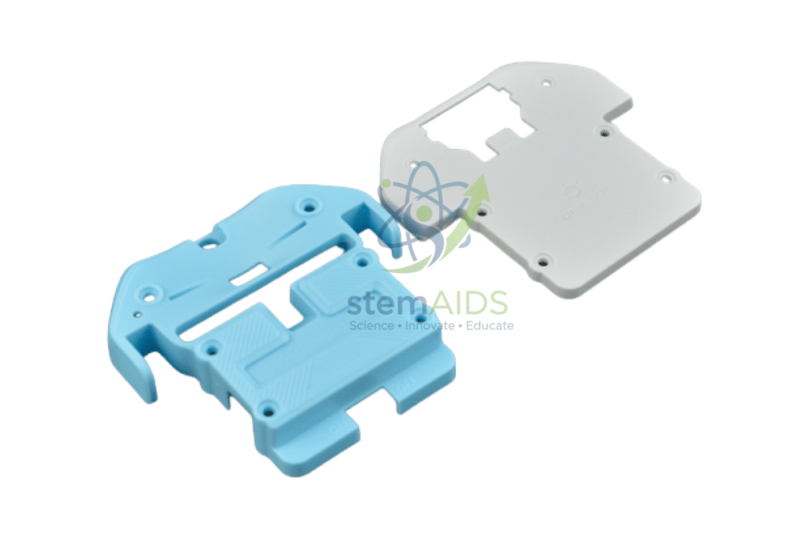
The Micro:bot Protection by StemAids is a practical protective accessory designed for compatible micro:bit-based educational robots such as Maqueen / Micro:bot classroom robots. It helps protect the robot body from common classroom bumps, minor impacts, accidental contact, and handling damage during regular robotics activities.
In STEM labs and coding classrooms, educational robots are frequently used by multiple students for line-following, obstacle-avoidance, robot racing, programming practice, and movement-based experiments. During these activities, the robot may collide with desks, walls, track borders, or other robots. The Micro:bot Protection accessory helps reduce the risk of damage and supports longer classroom usability.
This product is suitable for schools, training centers, robotics labs, STEM clubs, and project-based learning programs where micro:bit robots are used regularly. It is a useful add-on accessory for improving robot safety, protecting delicate components, and maintaining shared educational equipment in better working condition.
Key Features
- Protective accessory for compatible Micro:bot / Maqueen educational robots
- Helps protect the robot from most common minor shocks and classroom impacts
- Useful for STEM robotics, coding practice, and movement-based activities
- Helps reduce damage caused by bumps, handling, and accidental contact
- Suitable for repeated student use in school robotics labs
- Easy to fit on compatible robot models
- Helps improve classroom durability and robot storage safety
- Useful as an additional or replacement protection accessory for robotics kits
Product Specifications
| Product Name | Micro:bot Protection |
|---|---|
| Brand | StemAids |
| Product Type | Robot Protection Case / Robotics Accessory |
| Compatible Use | Compatible Micro:bot / Maqueen educational robot platforms |
| Instrument Type | Options Robots |
| Main Function | Protection against common classroom impacts, bumps, shocks, and handling damage |
| Application Area | STEM Robotics, micro:bit Robot Learning, Coding Activities, Classroom Robot Protection |
| Recommended Use | School STEM Labs, Robotics Labs, Coding Classes, Robotics Clubs, Innovation Labs |
| User Level | Beginner to Advanced |
| Package Note | Robot, micro:bit board, batteries, sensors, motors, and programming accessories are not included unless specifically mentioned in the final supplied package. |
How to Use Micro:bot Protection
- Check Compatibility: Confirm that the protection accessory is suitable for your Micro:bot or Maqueen robot model before installation.
- Switch Off the Robot: Turn off the robot and disconnect or remove the battery power before fitting the protection accessory.
- Position the Protection Case: Place the Micro:bot Protection accessory carefully around the compatible robot body.
- Align Openings and Ports: Make sure sensors, wheels, switches, LEDs, ports, and connectors are not blocked.
- Secure the Fit: Adjust or fasten the protection case according to the product design so it remains stable during robot movement.
- Test Robot Movement: Place the robot on a flat surface and check forward, reverse, turning, and line-following movement after installation.
- Use in Classroom Projects: Use the protected robot for coding, obstacle avoidance, line tracking, robot racing, and STEM demonstrations.
- Inspect Regularly: Check the protection accessory after repeated use to ensure it is properly fitted and not cracked or damaged.
Educational Benefits
The StemAids Micro:bot Protection helps schools protect shared robotics equipment during repeated student use. In active STEM classrooms, robots are tested, moved, programmed, and handled many times. A protective accessory helps reduce minor damage and supports longer product life.
This product is especially useful in line-following, obstacle-avoidance, robot racing, and group activity sessions. It allows students to test programs more confidently while teachers can better maintain robotics lab resources for long-term classroom use.
Applications
- Micro:bot / Maqueen robot protection
- STEM robotics classroom use
- Line-following robot activities
- Obstacle-avoidance robot projects
- Robot racing and movement testing
- School robotics club practice
- Coding and automation demonstrations
- Robot storage and handling protection
- Replacement or spare accessory for robotics labs
Why Choose StemAids Micro:bot Protection?
StemAids provides practical STEM learning accessories for schools, colleges, robotics labs, coding classrooms, and innovation-based learning spaces. The Micro:bot Protection by StemAids is designed to improve the durability and classroom usability of compatible educational robots.
For institutions using Micro:bot or Maqueen robots regularly, this protection accessory helps reduce downtime caused by accidental impact or handling damage. It is a simple but valuable addition to robotics kits used in STEM education, coding workshops, competitions, and project-based learning.
SEO Keywords
Micro:bot Protection, StemAids Micro:bot Protection, Micro:bot Protective Case, Maqueen Robot Protection, micro:bit Robot Protection Case, STEM Robotics Accessory, Educational Robot Protection, Robot Safety Cover, Robotics Kit Accessory, School Robotics Protection Case.
FAQ
1. What is Micro:bot Protection?
Micro:bot Protection is a protective accessory designed to help protect compatible Micro:bot or Maqueen educational robots from common classroom impacts, bumps, and handling damage.
2. Which brand offers this product?
This product is offered under the StemAids brand for STEM robotics, coding labs, and educational robot accessories.
3. Is the robot included with this product?
No, this product is a protection accessory. The robot, micro:bit board, batteries, sensors, motors, and programming accessories may need to be purchased separately unless included in a specific package.
4. Is it compatible with Maqueen robots?
Yes, this type of protection accessory is designed for compatible Maqueen / Micro:bot educational robot models. Compatibility should be checked with the final robot model before purchase.
5. Does it protect from all damage?
It helps protect the robot from most minor impacts and common classroom bumps. It does not make the robot fully damage-proof, waterproof, or suitable for rough outdoor use.
6. Can students install it themselves?
Students can install it under teacher supervision. The robot should be switched off before fitting the protection accessory.
7. Will it block sensors or wheels?
It should be fitted carefully so that sensors, wheels, switches, LEDs, and connection ports remain clear. Always test robot movement after installation.
8. Is it suitable for school STEM labs?
Yes, it is suitable for school STEM labs, robotics labs, coding classes, robotics clubs, and classroom project-based learning.
9. Why is a protection accessory useful for educational robots?
Educational robots are often used by multiple students. A protection accessory helps reduce damage during repeated handling, testing, and movement-based activities.
10. How should the protection accessory be maintained?
Clean it with a dry cloth, check for cracks or loose fitting, and ensure it remains properly aligned with the robot body before classroom use.
You must be logged in to post a review.
Bestsellers

Sale

Sale

Sale

Sale


Reviews
There are no reviews yet.