


In Stock
Micro:bit Wi-Fi kit without micro:bit interface
₹1,085.00
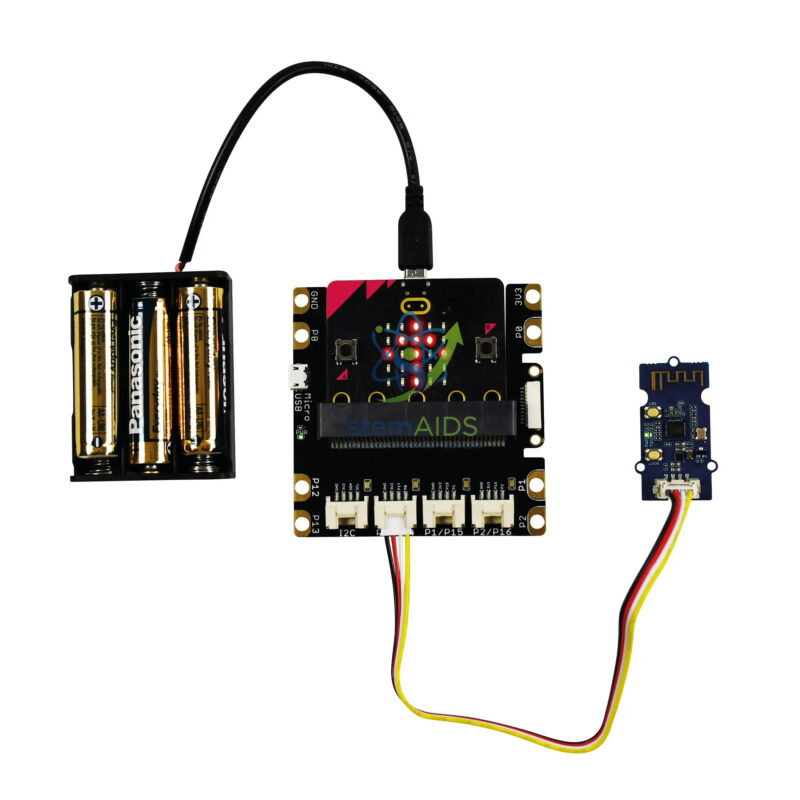
The Micro:bit Wi-Fi Kit Without micro:bit Interface by StemAids is an educational wireless communication kit designed to help students understand Wi-Fi-based connectivity, block programming, microcontroller communication, and basic IoT concepts. It is suitable for classroom demonstrations, STEM projects, coding workshops, robotics activities, and technology learning programs.
This kit introduces learners to how connected devices communicate wirelessly. With the help of a Wi-Fi Grove module and a compatible micro:bit setup, students can explore wireless data transfer, remote control concepts, network-based project logic, and smart device communication. It is especially useful for schools that want to introduce students to IoT and connected technology through practical activities.
The kit is supplied without the micro:bit interface, making it suitable for institutions that already have micro:bit interface boards or Grove-compatible expansion systems. Students can program the kit using a compatible block programming environment and use it as part of larger automation, communication, or robotics-based projects.
Key Features
- Educational Wi-Fi learning kit for micro:bit-compatible STEM projects
- Helps students understand wireless communication and IoT basics
- Includes Wi-Fi Grove module for connected project demonstrations
- Supports block programming for beginner-friendly classroom learning
- Supplied without micro:bit interface, suitable for labs with existing interface boards
- Includes battery holder and LR06 batteries for portable project use
- Useful for smart device, remote communication, and connected technology experiments
- Suitable for STEM labs, coding classes, robotics labs, and innovation projects
Product Specifications
| Product Name | Micro:bit Wi-Fi Kit Without micro:bit Interface |
|---|---|
| Brand | StemAids |
| Product Type | Wireless Communication / IoT STEM Learning Kit |
| Compatible Platform | micro:bit-compatible programming and interface setup |
| Interface Status | Without micro:bit Interface |
| Main Communication Module | Wi-Fi Grove module |
| Power Support | 3 LR06 battery holder with LR06 batteries |
| Programming Method | Block programming using a compatible micro:bit programming environment |
| Learning Concepts | Wi-Fi Communication, IoT Basics, Wireless Control, Coding Logic, Connected Devices, STEM Programming |
| Recommended Use | School STEM Labs, Coding Classes, IoT Workshops, Robotics Labs, Wireless Communication Projects |
| User Level | Beginner to Intermediate |
Kit Contents
- One 3 LR06 battery holder
- One Wi-Fi Grove module
- One set of 4 LR06 batteries
- Note: micro:bit interface is not included in this version
- Note: micro:bit board may be required separately depending on the supplied package and classroom setup
How to Use Micro:bit Wi-Fi Kit Without micro:bit Interface
- Check the Components: Verify the Wi-Fi Grove module, 3 LR06 battery holder, LR06 batteries, and required connection accessories before starting the activity.
- Prepare the micro:bit Setup: Since this kit is supplied without a micro:bit interface, arrange a compatible micro:bit board and Grove-compatible interface or expansion board separately.
- Connect the Wi-Fi Grove Module: Attach the Wi-Fi Grove module to the compatible interface port as per the wiring or classroom project guide.
- Connect the Power Supply: Insert the LR06 batteries into the battery holder and connect the power supply as required for the project setup.
- Open the Programming Platform: Use a compatible block programming environment suitable for micro:bit and the connected Wi-Fi module.
- Create the Program: Build a simple program to send, receive, or respond to wireless communication commands depending on the project requirement.
- Test Wireless Communication: Upload the program and test whether the connected system responds correctly to Wi-Fi-based instructions or data exchange.
- Improve the Project: Add sensors, motors, displays, relays, or other modules to create smart home, IoT, robotics, or remote monitoring projects.
Educational Benefits
The StemAids Micro:bit Wi-Fi Kit Without micro:bit Interface helps students understand how wireless communication is used in modern connected devices. It supports hands-on learning by allowing learners to build simple Wi-Fi communication projects instead of only studying IoT concepts theoretically.
This kit encourages practical learning in coding, communication technology, electronics, problem-solving, and automation. Teachers can use it to explain smart devices, wireless networks, remote control logic, and basic Internet of Things applications in a classroom-friendly manner.
Applications
- micro:bit Wi-Fi communication project
- IoT classroom demonstration
- Wireless control STEM activity
- Smart device learning model
- Remote data communication experiment
- Connected robotics project
- Block programming and wireless technology activity
- Innovation lab and project-based learning model
Why Choose StemAids Micro:bit Wi-Fi Kit Without micro:bit Interface?
StemAids provides practical STEM learning products that help schools and training institutions teach coding, robotics, electronics, and connected technology through hands-on projects. The Micro:bit Wi-Fi Kit Without micro:bit Interface by StemAids is designed to make wireless communication and IoT concepts easier for students to understand.
This kit is especially useful for institutions that already have micro:bit boards and compatible interface modules. It allows teachers to introduce Wi-Fi communication in a structured way and helps students build practical projects based on wireless control, connected devices, and smart automation.
SEO Keywords
Micro:bit Wi-Fi Kit Without micro:bit Interface, StemAids Micro:bit Wi-Fi Kit, micro:bit Wi-Fi Module Kit, Wi-Fi Grove Module for micro:bit, micro:bit IoT Kit, STEM Wireless Communication Kit, Educational IoT Kit for Schools, micro:bit Programming Kit, Wireless Communication STEM Kit, Smart Device Learning Kit.
FAQ
1. What is the Micro:bit Wi-Fi Kit Without micro:bit Interface?
It is an educational STEM kit used to teach Wi-Fi communication, wireless control, block programming, and basic IoT concepts using a micro:bit-compatible setup.
2. Which brand offers this product?
This product is offered under the StemAids brand for STEM education, coding, IoT learning, wireless communication, and project-based classroom activities.
3. Is the micro:bit interface included?
No, this version is supplied without the micro:bit interface. A compatible interface or Grove-compatible expansion board may be required separately.
4. Is the micro:bit board included?
The product title specifies that it is supplied without the micro:bit interface. The micro:bit board may also need to be arranged separately depending on the supplied package. Please confirm final package contents before purchase.
5. What components are included in the kit?
The kit includes one 3 LR06 battery holder, one Wi-Fi Grove module, and a set of 4 LR06 batteries.
6. What can students learn from this kit?
Students can learn Wi-Fi communication, IoT basics, wireless control, block programming, connected device logic, electronics, and STEM project development.
7. Is this kit suitable for beginners?
Yes, it is suitable for beginners when used with block programming and teacher-guided classroom activities.
8. Can this kit be used for IoT projects?
Yes, the kit is suitable for basic IoT learning projects involving wireless communication and connected device demonstrations.
9. Can it be used in school STEM labs?
Yes, it is suitable for school STEM labs, robotics labs, coding classes, IoT workshops, technology classrooms, and innovation lab projects.
10. What safety precautions should be followed?
Students should use the kit under teacher supervision, insert batteries correctly, avoid short circuits, and connect the Wi-Fi module only to compatible interface ports.
You must be logged in to post a review.
Bestsellers

Sale
Sale

Sale


Reviews
There are no reviews yet.