





In Stock
Micro:bit v2 Board
$7.33
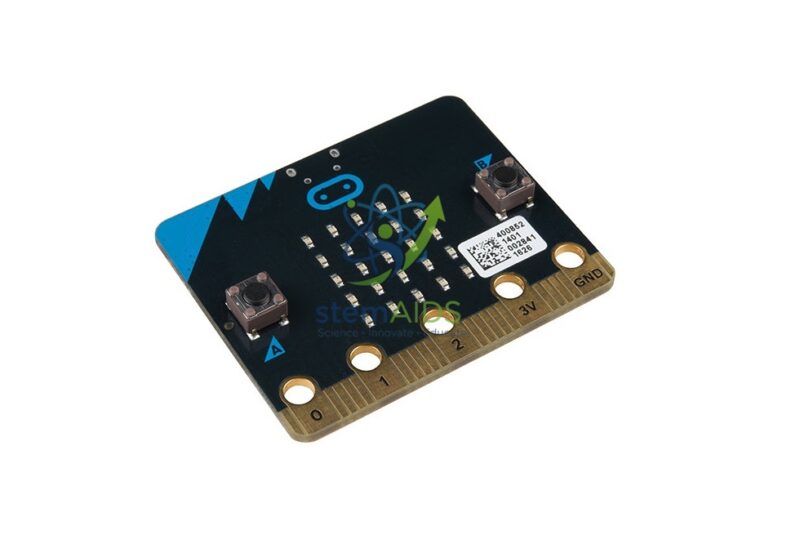
The StemAids Micro:bit V2 Board is a compact programmable microcontroller board designed for coding, electronics, robotics, STEM education, ICT classrooms, maker spaces, innovation labs, and beginner-to-intermediate programming activities. It helps students learn how software and hardware work together through hands-on projects using lights, buttons, sensors, sound, wireless communication, and external electronic components.
Based on the BBC micro:bit V2, this board is suitable for schools, colleges, coding clubs, STEM labs, robotics training, IoT projects, and classroom demonstrations. It supports block coding, JavaScript, Python, and MicroPython programming environments, making it useful for both beginners and advanced learners.
Product Overview
The StemAids Micro:bit V2 Board is a pocket-sized programmable board that allows learners to create interactive projects quickly. Students can display messages on the LED matrix, use buttons as input, detect movement with the accelerometer, sense direction with the compass, measure light and temperature, respond to sound using the microphone, and produce audio through the built-in speaker.
The board also includes radio and Bluetooth communication support, allowing wireless projects between multiple micro:bit boards and compatible devices. Its edge connector provides access to GPIO pins for connecting LEDs, buzzers, motors, sensors, crocodile clips, expansion boards, and robotics accessories.
Key Features
- Beginner-Friendly Programmable Board: Ideal for learning coding, electronics, robotics, and STEM concepts.
- 5×5 LED Matrix: Displays text, icons, numbers, animations, and project outputs using 25 red LEDs.
- Programmable A and B Buttons: Useful for games, counters, menus, controls, and interactive projects.
- Touch-Sensitive Logo: Works as an additional input for creative coding activities.
- Built-In Speaker: Allows students to create music, alerts, tones, and sound-based projects.
- Built-In Microphone: Supports sound-sensing projects, noise-level detection, and audio-triggered activities.
- Motion Sensor: Accelerometer detects tilt, shake, movement, orientation, and acceleration.
- Compass Sensor: Helps create direction-based projects and magnetic field experiments.
- Radio and Bluetooth Support: Enables wireless communication for group projects and connected learning.
- GPIO Edge Connector: Allows external connection with sensors, LEDs, motors, buzzers, and expansion boards.
Product Specifications
| Product Name | Micro:bit V2 Board |
|---|---|
| Brand | StemAids |
| Board Type | Programmable Microcontroller Board / STEM Coding Board |
| Main Board | BBC micro:bit V2 |
| Processor | Nordic nRF52833 Arm Cortex-M4 32-bit processor with FPU |
| Processor Speed | 64 MHz |
| Memory | 512KB Flash ROM and 128KB RAM |
| Display | 5×5 red LED matrix with 25 programmable LEDs |
| Inputs | Button A, Button B, touch logo, microphone, accelerometer, compass, light sensing, and temperature sensing |
| Outputs | LED matrix, built-in speaker, GPIO pins, radio communication, and serial communication |
| Wireless Connectivity | 2.4GHz radio and Bluetooth Low Energy support |
| USB Interface | Micro USB for programming, power, and serial communication |
| Power Options | Micro USB power or compatible battery pack, commonly 2×AAA battery pack |
| Edge Connector | 25-pin edge connector with GPIO, 3V, GND, analog input, PWM, I2C, SPI, and serial support depending on coding setup |
| Programming Platforms | Microsoft MakeCode, JavaScript, Python, MicroPython, and compatible micro:bit editors |
| Application Area | STEM labs, ICT classrooms, coding labs, robotics clubs, maker spaces, and school projects |
| Recommended Users | Students, teachers, coding beginners, STEM trainers, robotics learners, and institutional buyers |
How to Use the StemAids Micro:bit V2 Board
- Connect the Board: Use a Micro USB cable to connect the micro:bit V2 board to a laptop or desktop computer.
- Open a Coding Editor: Use Microsoft MakeCode, Python editor, MicroPython editor, or another compatible micro:bit programming platform.
- Create a Program: Start with simple activities such as displaying a name, showing an icon, playing a sound, or using buttons.
- Download the Program: Download the program file and copy it to the MICROBIT drive shown on the computer.
- Run the Code: The board will flash the program and run it automatically.
- Use Sensors: Try projects using the accelerometer, compass, microphone, touch logo, light sensor, and temperature sensing.
- Make It Portable: Connect a compatible battery pack to run the project without USB power.
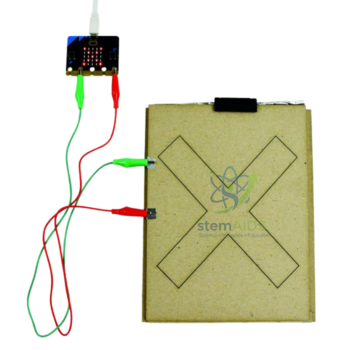
- Add External Components: Use the edge connector, crocodile clips, or expansion boards to connect LEDs, buzzers, motors, and sensors.
Educational Benefits
The StemAids Micro:bit V2 Board helps students learn coding through practical and interactive activities. It connects programming concepts with real-world outputs such as lights, sound, movement detection, wireless messages, and sensor readings.
- Introduces coding, logic, algorithms, loops, variables, and conditions
- Supports block coding for beginners and Python/MicroPython for advanced learners
- Helps students understand input, output, sensors, and physical computing
- Useful for robotics, IoT, STEM, maker projects, and classroom innovation labs
- Encourages creativity through games, alarms, counters, music, and science projects
- Supports individual practice, group activities, teacher demonstrations, and project-based learning
Applications
- Beginner coding lessons
- STEM lab activities
- Robotics and electronics projects
- IoT and sensor-based experiments
- Classroom programming demonstrations
- Science fair and innovation projects
- Wireless communication activities
- Environmental monitoring projects
- Digital games and interactive displays
- Maker space and coding club learning
Why Choose StemAids Micro:bit V2 Board?
StemAids provides practical STEM education products for schools, ICT labs, coding classrooms, robotics labs, maker spaces, and institutional learning environments. The StemAids Micro:bit V2 Board is a suitable choice for schools and training centers that want an easy, reliable, and engaging platform for coding and electronics education.
With its LED display, buttons, touch logo, sensors, speaker, microphone, radio, Bluetooth, and GPIO expansion, this board helps students move from screen-based coding to real-world physical computing. It is ideal for classroom learning, project-based education, robotics clubs, and hands-on STEM programs.
Safety and Maintenance Guidelines
- Use only compatible USB cables, battery packs, and accessories.
- Do not connect external components beyond the recommended voltage and current limits.
- Keep the board away from water, dust, excessive heat, and direct physical impact.
- Handle the edge connector carefully and avoid short circuits between pins.
- Disconnect the battery pack when the board is not in use for a long period.
- Use crocodile clips, external components, and expansion boards under teacher supervision.
- Store the board in a clean, dry, anti-static-safe box after use.
- Use age-appropriate activities for younger learners.
Google E-E-A-T Focus
This product content is prepared for school procurement teams, STEM coordinators, ICT teachers, coding trainers, robotics educators, and institutional buyers. It focuses on verified micro:bit V2 features, practical classroom use, safe handling, programming benefits, and educational value to support Google E-E-A-T principles of experience, expertise, authoritativeness, and trustworthiness.
Frequently Asked Questions
1. What is the StemAids Micro:bit V2 Board used for?
It is used for learning coding, electronics, sensors, robotics basics, STEM activities, physical computing, and beginner programming projects.
2. Is micro:bit V2 suitable for beginners?
Yes, it is suitable for beginners because students can start with block coding and later move to JavaScript, Python, or MicroPython.
3. What sensors are available on micro:bit V2?
The board includes an accelerometer, compass, temperature sensor, light sensing through the LED matrix, microphone, buttons, and touch logo.
4. Does the micro:bit V2 have a speaker?
Yes, micro:bit V2 includes a built-in speaker for music, tones, alerts, and sound-based projects.
5. Can it be programmed using Python?
Yes, micro:bit V2 supports Python and MicroPython through compatible programming editors.
6. Does it support wireless communication?
Yes, it supports radio communication between micro:bit boards and Bluetooth Low Energy for compatible device interaction.
7. Can it be used for robotics projects?
Yes, it can be used with compatible motor drivers, robotics kits, sensors, expansion boards, and external components.
8. Does the board need batteries?
It can be powered through Micro USB while programming, or through a compatible battery pack for portable projects.
9. Is it suitable for school STEM labs?
Yes, it is suitable for STEM labs, ICT classrooms, coding clubs, robotics labs, maker spaces, and school innovation programs.
10. What age group can use this board?
It is commonly used by school students and beginners under teacher supervision. Activity difficulty can be adjusted according to age and curriculum level.
SEO Keywords
Micro:bit V2 Board, StemAids Micro:bit V2 Board, BBC micro:bit V2, micro:bit coding board, micro:bit board for schools, STEM coding board, microcontroller board for students, beginner coding board, Python coding board, MakeCode micro:bit board, robotics board for classroom, physical computing board, micro:bit V2 for STEM lab, electronics learning board.
You must be logged in to post a review.
Bestsellers

Sale
Sale
Sale


Reviews
There are no reviews yet.