


In Stock
Micro:bit Greenhouse with micro:bit Interface
₹12,450.00
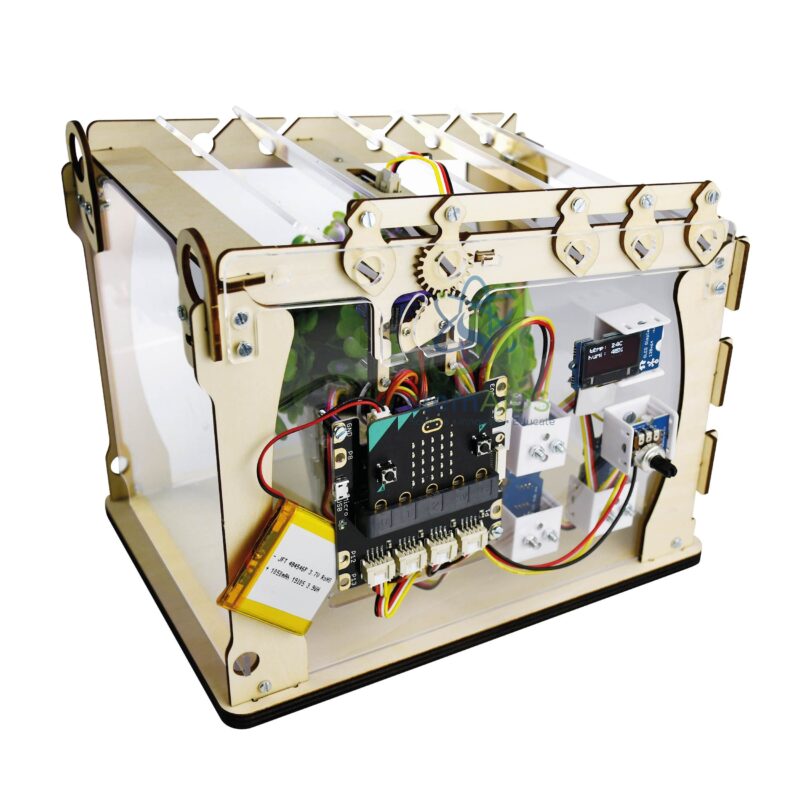
The Micro:bit Greenhouse with micro:bit Interface by StemAids is an educational smart greenhouse model designed to help students learn coding, plant monitoring, automation, environmental science, sensor technology, and STEM-based project development. It allows learners to understand how a programmed microcontroller can monitor and control greenhouse conditions using sensors and actuators.
This mini greenhouse model is equipped with a micro:bit and Grove interface, making it suitable for classroom experiments in block coding, Python programming, smart agriculture, IoT basics, and automated plant care. Students can observe light, temperature, humidity, soil moisture, and ventilation-related concepts through hands-on activities.
The greenhouse includes a servo-controlled pergola-style roof mechanism. Students can program or adjust the opening and closing of the roof to demonstrate ventilation control. The model also includes Grove sensors and display modules, allowing learners to build practical projects based on environmental data and automated decision-making.
Key Features
- Programmable mini greenhouse model for micro:bit-based STEM learning
- Includes micro:bit and Grove interface for easier module connectivity
- Servo motor-controlled pergola-style roof for ventilation demonstrations
- Grove light sensor for light-level monitoring activities
- Grove humidity and temperature sensor for climate-related experiments
- Grove soil humidity sensor for plant moisture monitoring
- 1.12-inch Grove OLED screen for displaying project data
- Grove LED bar for visual indication and classroom demonstrations
- Supports MakeCode block programming and Python-based learning
- Useful for smart agriculture, IoT, automation, coding, and environmental science projects
Product Specifications
| Product Name | Micro:bit Greenhouse with micro:bit Interface |
|---|---|
| Brand | StemAids |
| Product Type | Programmable Smart Greenhouse STEM Model |
| Compatible Platform | BBC micro:bit with Grove interface |
| Programming Support | MakeCode block programming and Python |
| Greenhouse Structure | Complete wooden greenhouse with plexiglass window |
| Roof Mechanism | Servo motor-controlled pergola-style opening and closing roof |
| Control Components | Angular micro-servo motor and Grove potentiometer |
| Sensors Included | Grove light sensor, Grove humidity/temperature sensor, Grove soil humidity sensor |
| Display Module | 1.12-inch Grove OLED screen |
| Indicator Module | Bar of 10 Grove LEDs |
| Expansion Module | Grove I2C HUB |
| Approximate Dimensions | L 240 x W 175 x H 200 mm |
| Assembly Format | Preassembled programming wall, delivered flat with assembly and wiring instructions |
| Learning Concepts | Smart Agriculture, Plant Monitoring, Coding, Sensors, Automation, IoT Basics, Environmental Science |
| Recommended Use | School STEM Labs, Coding Classes, Robotics Labs, Environmental Science Projects, Innovation Labs |
| User Level | Beginner to Intermediate |
Kit Contents
- One micro:bit and Grove interface
- One complete wooden greenhouse with plexiglass window
- One angular micro-servo motor
- One bar of 10 Grove LEDs
- One Grove light sensor
- One Grove potentiometer
- One Grove humidity/temperature sensor
- One 1.12-inch Grove OLED screen
- One Grove I2C HUB
- One Grove soil humidity sensor
- Required connection cables
- Assembly, wiring, and programming guidance as per supplied instructions
How to Use Micro:bit Greenhouse with micro:bit Interface
- Unpack and Check Components: Verify the greenhouse body, micro:bit interface, servo motor, Grove sensors, OLED display, LED bar, I2C hub, cables, and assembly accessories.
- Assemble the Greenhouse: Assemble the wooden greenhouse structure as per the supplied instructions and fit the plexiglass window carefully.
- Connect the Interface: Connect the micro:bit board with the Grove interface and place the programming section correctly on the greenhouse model.
- Attach Sensors and Modules: Connect the Grove light sensor, humidity/temperature sensor, soil humidity sensor, OLED screen, LED bar, potentiometer, and I2C hub to the correct interface ports.
- Connect the Servo Motor: Attach the angular micro-servo motor to the roof mechanism so it can open and close the pergola-style roof.
- Open MakeCode: Use Microsoft MakeCode for block-based programming. Advanced learners can use Python depending on the classroom setup.
- Create a Monitoring Program: Program the micro:bit to read light, temperature, humidity, and soil moisture values from the connected sensors.
- Display the Data: Use the OLED screen or LED bar to display or indicate greenhouse conditions.
- Control Ventilation: Program the servo motor to open or close the greenhouse roof based on sensor values or manual potentiometer input.
- Test and Improve: Change threshold values, add conditional logic, and compare how plants respond to light, air, moisture, and temperature changes.
Educational Benefits
The StemAids Micro:bit Greenhouse with micro:bit Interface helps students connect science, coding, and real-life agriculture technology. It supports activity-based learning by showing how sensors collect environmental data and how programmed instructions can control physical systems.
This model is useful for explaining smart farming, greenhouse ventilation, plant growth conditions, sensor calibration, data display, automation logic, and IoT-based monitoring. It encourages students to observe, measure, program, test, and improve their projects through practical experimentation.
Applications
- Smart greenhouse classroom demonstration
- Plant growth monitoring project
- Soil moisture sensing experiment
- Temperature and humidity monitoring activity
- Light-level detection and response project
- Servo-controlled ventilation model
- micro:bit coding and Grove sensor experiments
- IoT and smart agriculture learning project
- Environmental science and STEM lab activity
- Innovation lab and project-based learning model
Why Choose StemAids Micro:bit Greenhouse with micro:bit Interface?
StemAids provides practical STEM learning products that help schools and training institutions teach coding, robotics, automation, and science through working models. The Micro:bit Greenhouse with micro:bit Interface by StemAids is designed to make smart agriculture and environmental monitoring easy to understand through hands-on classroom experiments.
This product gives students a complete learning experience by combining greenhouse structure, sensors, display modules, servo movement, and programming. It is suitable for schools that want to introduce modern concepts such as IoT, plant monitoring, climate control, smart farming, and sustainable technology in an engaging and practical format.
SEO Keywords
Micro:bit Greenhouse with micro:bit Interface, StemAids Micro:bit Greenhouse, Smart Greenhouse STEM Kit, micro:bit Greenhouse Kit, Grove Sensor Greenhouse Model, Educational Smart Agriculture Kit, micro:bit Plant Monitoring Kit, STEM Greenhouse Model, IoT Greenhouse Learning Kit, Robotics Kit for Schools.
FAQ
1. What is the Micro:bit Greenhouse with micro:bit Interface?
It is an educational programmable mini greenhouse model that uses a micro:bit and Grove interface to monitor environmental conditions and control a servo-operated roof mechanism.
2. Which brand offers this product?
This product is offered under the StemAids brand for STEM, coding, smart agriculture, and automation learning applications.
3. What can students learn from this greenhouse kit?
Students can learn coding, sensor integration, plant monitoring, smart agriculture, servo control, data display, environmental science, automation logic, and IoT basics.
4. Does this kit include a micro:bit interface?
Yes, this version includes a micro:bit and Grove interface, making it easier to connect Grove sensors and modules for classroom projects.
5. Which sensors are included?
The kit includes Grove light sensor, Grove humidity/temperature sensor, and Grove soil humidity sensor for environmental monitoring activities.
6. What is the function of the servo motor?
The servo motor controls the opening and closing of the pergola-style roof, helping students understand ventilation control in greenhouse automation.
7. Can the greenhouse data be displayed?
Yes, the kit includes a 1.12-inch Grove OLED screen and a Grove LED bar that can be used to display or indicate sensor readings and system status.
8. Is this product suitable for beginners?
Yes, beginners can use MakeCode block programming. Advanced learners can explore Python programming depending on the project requirement.
9. Is assembly required?
Yes, the model is delivered flat with a preassembled programming section. Assembly and wiring should be completed according to the supplied instructions.
10. Can this kit be used in school STEM labs?
Yes, it is suitable for school STEM labs, robotics labs, coding classes, environmental science labs, agriculture technology demonstrations, and innovation projects.
You must be logged in to post a review.
Bestsellers

Sale
Sale
Sale


Reviews
There are no reviews yet.