




In Stock
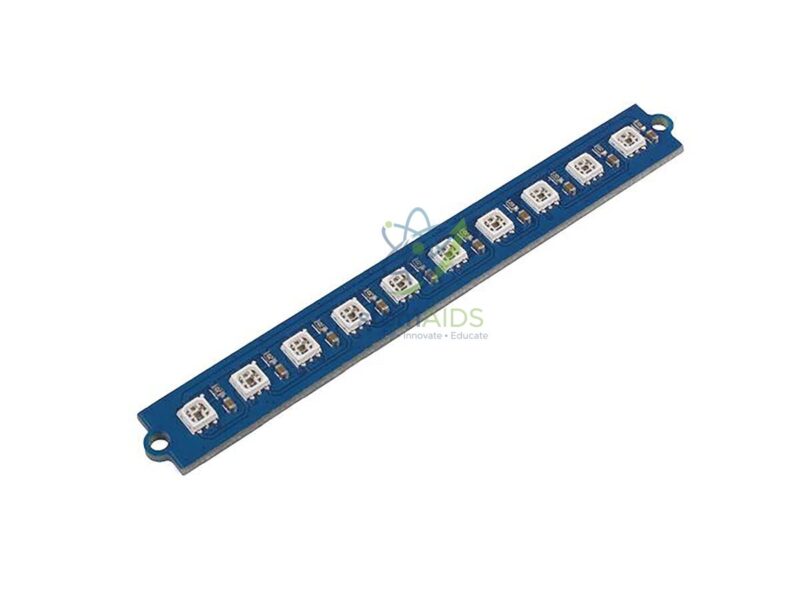
Grove RGB LED Bar Module 10
₹250.00
Quick Answer: The Grove RGB LED Bar Module 10 is a Grove plug-in module carrying a row of ten LED positions that can show colour. Students light a number of positions in proportion to a reading, turning a sensor value into a bar graph, and use colour to mark safe, warning and alarm levels.
Turning a Number into a Bar
A bar display shows a quantity by how many lights are on, which people take in faster than a printed number. With ten positions, each light stands for a tenth of the full range, so a program reading a sound level or a temperature only has to scale the value to a whole number from 0 to 10 and light that many LEDs. Students meet scaling, rounding and loops in one short program.
RGB in the name means the lights can be set to different colours rather than one fixed colour. That adds a second layer of information: the first positions green, the middle amber and the top red, as on audio level meters and battery indicators, or one colour that changes as a threshold is crossed. How the colours are addressed depends on the driver used on the module, so follow the documentation or example code supplied with it.
Grove LED bars sold under similar names differ, some using fixed-colour segments and others individually programmable colour LEDs, so confirm which type this listing supplies before planning colour-changing lessons.
Applications
- Sound-level meter fed by a microphone or sound sensor
- Battery or water-tank level indicator in a model
- Progress bar for a timer or a reaction game
- Visual check of a knob position during a first analog-input lesson
Specifications
| Item | LED bar module with Grove connector |
| Positions | 10, from the listing title |
| Colour | RGB, as named in the listing title |
| Control | Set from code through a library or block extension |
| Typical displays | Levels, progress, signal strength and countdowns |
| LED type and driver chip | Confirm at enquiry |
Care & Handling
- Do not look straight into LEDs set to full white at close range; lower the brightness in code for classroom use.
- Handle the module by its edges and keep it dry.
- Plug it into the port type named in its documentation, since a module in the wrong kind of port will not respond.
Why Choose LabEquip
Teachers use LED bar modules to show data visually before students move on to screens. LabEquip includes this module in its STEM kits range, and a good first exercise is driving it from the Grove rotary potentiometer module. For class quantities, write through the contact page.
Frequently Asked Questions
What does RGB mean on an LED bar?
RGB stands for red, green and blue. An RGB LED mixes these three colours at different strengths to make other colours, so one light position can show green, amber, red or white as the program decides.
How do I show a sensor reading on the bar?
Scale the reading to the range 0 to 10, for example by dividing by the maximum value and multiplying by ten, then light that many positions. Colouring the upper positions differently makes high values stand out.
How is this different from a single-colour LED bar?
Single-colour bars have segments fixed at one colour each, so the program only switches them on or off. An RGB bar lets the program choose each position’s colour, which allows colour-coded levels. Confirm which type is supplied when you enquire.
Can I make animations on the bar?
Yes. Lighting positions one after another with short delays gives a running light, and fading colours in a loop gives a smooth pulse. These animations are a good way to practise loops and timing.
Can the bar run without a computer after programming?
Yes. Once the code is uploaded to the microcontroller, the bar runs from the board’s power supply, including a battery pack, so projects such as a portable sound meter work away from the computer.
What skills does the module teach?
It teaches output control, scaling a range of values, loops for lighting several positions and functions that turn data into colours. It also teaches a design idea: presenting information in a form people can read at a glance.
Last Updated: September 2026
You must be logged in to post a review.
Bestsellers


Sale
Sale

Sale


Reviews
There are no reviews yet.