

In Stock
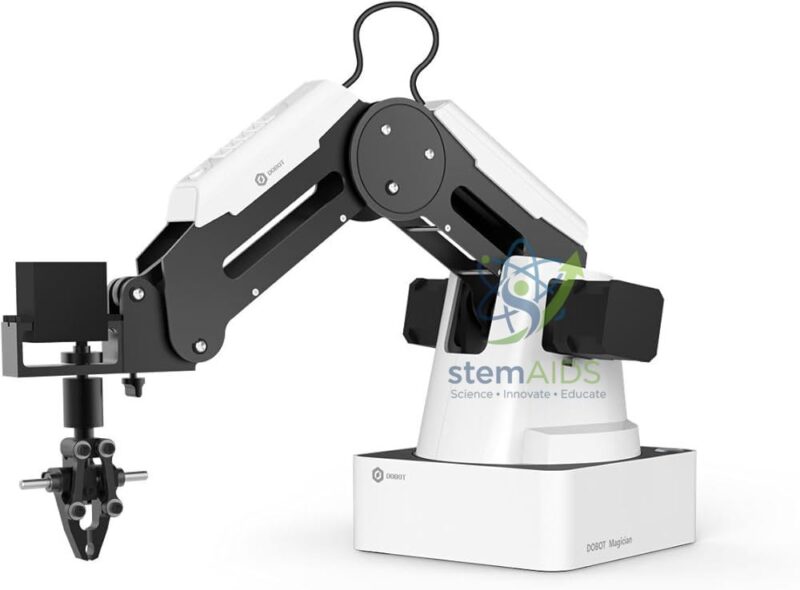
Dobot Magician Basic Arm
₹30,260.00
Quick Answer: The Dobot Magician Basic Arm is a compact desktop robotic arm used in schools, colleges and training centres to teach robot motion, coordinates and programming. It accepts interchangeable end tools, so the same arm can pick and place objects, draw or write, and act as the core of larger automation projects.
What Students Learn on a Desktop Arm
The Dobot Magician Basic Arm brings the ideas behind an industrial robot down to bench size. Students learn that every position the tool reaches can be described by X, Y and Z coordinates, that the arm gets there by turning several joints together, and that a robot program is really a list of target points, speeds and tool actions, all at a scale suited to a classroom desk.
Programming usually starts with teach-and-playback, where the arm is guided to each point and the positions are recorded, then moves on to block coding and later to text languages such as Python. Fitted with a pen, the arm draws shapes and letters, a gentle way to introduce path planning; fitted with a suction cup or gripper, it stacks and sorts blocks.
‘Basic’ in the name refers to the entry configuration of the Magician. The end tools, accessories and software supplied with this configuration should be confirmed before ordering. Add-ons such as the Dobot Conveyor later extend the arm into a small production cell.
Applications
- Making coordinate geometry and robot kinematics visible: moving the tool along X, Y and Z and watching the joints respond
- Pick-and-place and stacking tasks with a suction cup or gripper
- Drawing and writing with a pen holder to practise path planning
- A starting point for conveyor, sensor and vision projects in robotics clubs and engineering courses
Specifications
| Type | Desktop robotic arm for education |
| Brand and model | Dobot Magician, basic configuration |
| Programming | Teach-and-playback, block-based and text programming through Dobot software |
| End tools | Interchangeable; pick-and-place and drawing tools are typical |
| Supplied end tools, axes and reach | Confirm at enquiry |
Care & Handling
- Before a session, clear the table around the Dobot Magician Basic Arm and home the arm so it starts from a known reference.
- Keep loads light and within the payload given in the arm’s manual; overloading strains the joints and spoils accuracy.
- Do not force the joints by hand while the motors are powered unless the arm is in its teaching mode.
- Keep liquids away from the base and controller, and store the arm with its tools removed and packed separately.
Why Choose LabEquip
Teachers usually choose a desktop arm like this when a school sets up a robotics or AI lab and wants every group to program a real robot rather than a simulation. LabEquip lists the arm in its Stem Kits range together with accessories such as the conveyor; for a class set, share the number of stations through the contact page.
Frequently Asked Questions
What can students program the arm to do?
Typical tasks are moving between recorded points, picking and stacking blocks, drawing shapes and letters with a pen, and sorting objects. With extra accessories the arm can also work with a conveyor, sensors or a camera.
Which programming methods are used?
Beginners record positions by guiding the arm and then play them back. Next comes block-based coding in the Dobot software, and older students can script moves in a text language such as Python, adding loops, conditions and calculations.
Is the arm accurate enough for drawing and stacking?
Desktop education arms of this class are designed for tasks like these at classroom scale. Accuracy depends on homing the arm correctly, keeping the load light and fixing the base so it does not shift during fast moves.
What is the difference between this arm and the Dobot Magician E6?
The Magician is a compact desktop arm for introductory robotics. The Magician E6 is a larger six-axis collaborative robot with more joints, so it can orient the tool as well as position it, which suits college and research work.
Which end tools come with the basic arm?
Tool sets differ between configurations, so confirm the supplied tools when you enquire. Commonly used tools include a suction cup for flat objects, a gripper for small blocks and a pen holder for drawing.
What safety rules apply in class?
Keep hands and faces out of the arm’s reach while a program runs, clear the table of loose items, supervise younger students and know how to stop the arm quickly. Never leave a running program unattended.
Last Updated: September 2026
You must be logged in to post a review.
Bestsellers

Sale
Sale
Sale


Reviews
There are no reviews yet.