





In Stock
Wired Thymio 4 case
$38.92
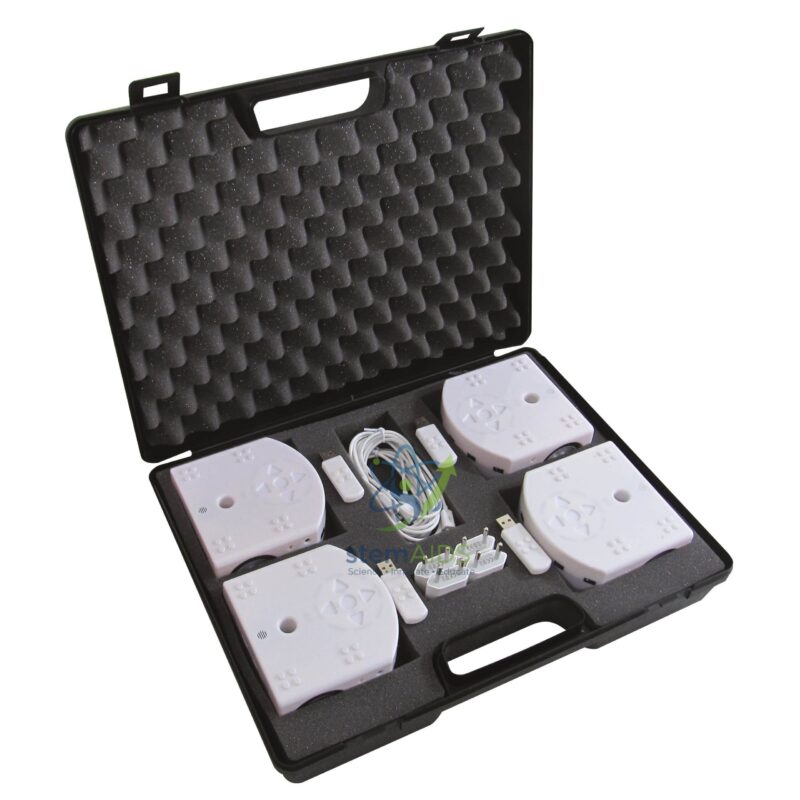
Quick Answer: Wired Thymio 4 case is a carry case holding a small set of wired Thymio educational robots, read from the title as four robots, for group coding lessons. A wired Thymio case suits classes where each group programs its own robot from a computer over a USB cable.
Wired Robots Kept Together in One Case
Wired Thymio robots are programmed through a USB cable plugged into a computer, the same cable that charges their battery. Compared with the wireless version, there is no radio dongle to set up and no chance of one group’s program reaching another group’s robot, which makes wired robots a straightforward choice for a first robotics unit in a computer room.
The case keeps the robots and their cables together, so a teacher can carry a complete set between classrooms, count everything back in at the end of a lesson and store the robots protected from knocks. A set of four robots suits a class split into groups of three to five students, or a club in which each pair has its own robot.
The trade-off is the cable: a robot tethered to a computer can only move as far as its lead while a program is tested live. Teachers usually work around this by sending the program to the robot, unplugging it and then running it on the floor or on a track.
How Schools Use a Case of Wired Robots
- Introductory robotics units in a computer room, one robot per group at a workstation
- Moving a complete set between classrooms or between schools in a cluster
- Weekly coding clubs where the same robots must be counted in and out
- Teacher training days, where each table of participants shares a robot
Specifications
| Contents | Wired Thymio robots with USB cables in a carry case |
| Robot count | Four, as read from the ‘4’ in the title; confirm at enquiry |
| Connection | USB cable to a computer for programming and charging |
| Programming software | Thymio Suite (VPL, Blockly, Scratch, Aseba) |
| Storage | Carry case keeping robots and cables together |
Looking After the Set
- Check that every robot and cable is back in the case before it is closed; a cable left in a laptop bag is the usual loss.
- Charge the robots the day before a lesson, since wired robots charge only while plugged in.
- Close the case with the robots switched off so that none is drained by being left on.
- Keep the case flat and dry, and do not stack heavy boxes on top of it.
Why Choose LabEquip
A ready case suits schools that want a first set of robots without assembling cables and storage themselves. LabEquip supplies it alongside single Robot Thymio II units for groups that need an extra robot, as part of its General Lab Products listing. For a quote with the set contents confirmed, contact LabEquip.
Frequently Asked Questions
What is the difference between wired and wireless Thymio robots?
Wired robots are programmed through a USB cable to the computer. Wireless robots contain a radio module and talk to the computer through a USB dongle, so they can stay connected to the software while they move around the floor.
Can a wired Thymio run a program without the cable?
Yes. Once the program has been sent to the robot, the cable can be unplugged and the robot keeps running it until it is switched off, so pupils can test on the floor or on a track.
How many students can work with one case?
With four robots, most teachers plan groups of three to five students per robot. Smaller groups keep everyone involved; larger groups work better when roles such as programmer, tester and recorder are rotated.
Do the robots need to be charged separately?
Wired robots charge while connected by USB, whether to a computer during the lesson or to a charger afterwards. For several robots, a multi-port charging hub keeps charging in one place.
Can wired robots be upgraded to wireless later?
A wireless option has been offered for Thymio II robots, adding a radio module inside the robot and a USB dongle for the computer. Check that the option matches your robot version before planning an upgrade.
Which software do the students use?
Thymio Suite, Mobsya’s free software, provides the VPL visual editor, Blockly, Scratch and the Aseba text language. Install it on each computer before the lesson and connect one robot to test it.
Last Updated: September 2026
You must be logged in to post a review.
Bestsellers




Reviews
There are no reviews yet.