











In Stock
USB Hub 4 ports USB 2.0
$9.66
Quick Answer: The USB Hub 4 ports USB 2.0 is a small box that connects to one USB port on a computer and provides four USB ports in return. A 4-port USB 2.0 hub lets a single lab PC take a keyboard, mouse, data logger and flash drive at the same time.
What USB 2.0 Means for a Hub
USB 2.0 is the Hi-Speed standard, with a signalling rate of 480 Mbit/s. That rate is shared between everything plugged into the hub, which is plenty for keyboards, mice, microcontroller boards, sensors and occasional file transfers, but slower than USB 3.0 when copying large files from a fast drive.
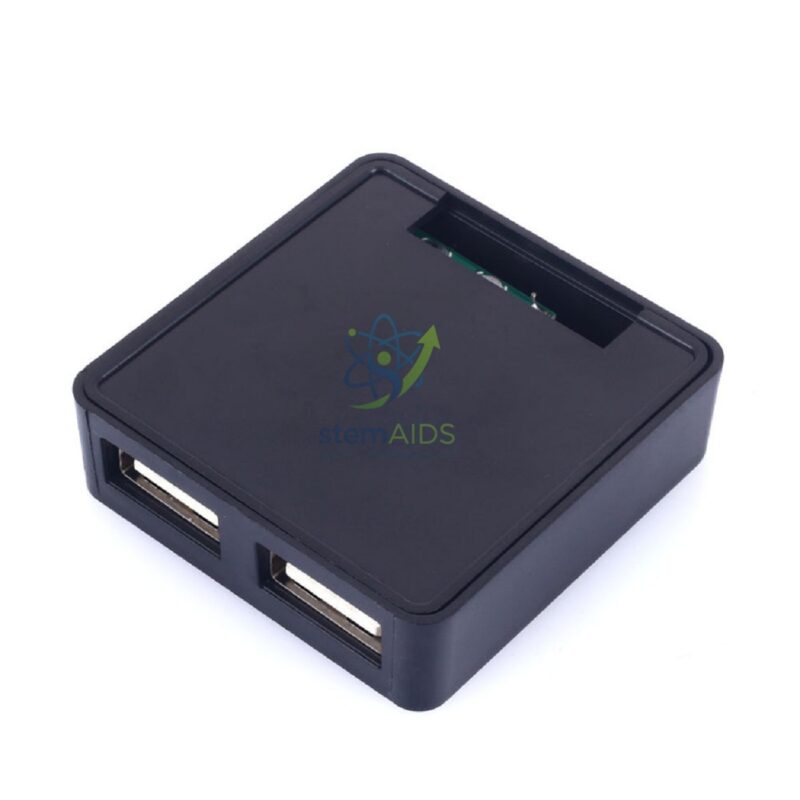
A hub without its own power supply takes all its power from the computer’s single port. Under the USB 2.0 standard that port supplies up to 500 mA, shared between the four devices, so low-power items work well while hungry devices, such as portable hard disks, may not. The listing photo shows a compact square hub, and whether it has a power input is not stated. Where devices need more power or speed, the 4-port USB 3.0 hub with external power supply is the alternative.
In practice the hub is most useful on lab PCs with few front-facing ports, or where the tower hangs in an under-desk CPU holder, bringing connections up to desk level where students plug in their own equipment.
Specifications
| Ports | Four USB ports, as titled |
| Standard | USB 2.0 Hi-Speed, up to 480 Mbit/s shared |
| Upstream connection | One USB lead to the computer |
| Form | Compact square housing, black (per listing photo) |
| Power input and cable length | Confirm at enquiry |
Applications
- Adding ports to a lab PC for keyboard, mouse and flash drive
- Connecting data loggers and sensors during science practicals
- Programming microcontroller boards in STEM lessons without reaching behind the PC
- Bringing USB ports to the desk top when the computer sits under it
Care & Handling
- Plug the hub in before starting devices that need a stable connection, such as a data logger mid-experiment.
- Avoid chaining several unpowered hubs together, as each one adds load to the single computer port.
- Place the hub where its cable is not pulled when students move equipment.
- If a device disconnects repeatedly, try it directly in the computer to see whether it needs more power than the hub gives.
Why Choose LabEquip
ICT and science departments order small hubs in sets to give each workstation extra ports for sensors and student devices. LabEquip lists this hub in General Lab Products; send the number of workstations through the contact page.
Frequently Asked Questions
How fast is a USB 2.0 hub?
USB 2.0 Hi-Speed signals at up to 480 Mbit/s, shared between the devices on the hub. That is fast enough for keyboards, mice, sensors and small files, but a USB 3.0 hub is quicker for large file copies.
Can I plug USB 3.0 devices into it?
Yes. USB 3.0 devices are backward compatible and work on a USB 2.0 hub, but only at USB 2.0 speed.
Can the hub power an external hard drive?
An unpowered USB 2.0 hub shares the computer port’s limited current between four ports, which is often not enough for a portable hard drive. Connect such drives directly or use a powered hub.
Will the hub work without installing drivers?
USB hubs belong to a standard device class, so current operating systems recognise them automatically when plugged in.
Why does a device on the hub keep disconnecting?
It may be drawing more current than the hub can share, or the cable may be loose. Move it to a computer port or a powered hub, and check that the hub’s own lead is fully inserted.
Can I use the hub to charge phones or tablets?
Only slowly, if at all. Hubs of this type are for data connections, and the small current available is shared across all ports; a dedicated charger is the right tool.
Last Updated: September 2026
You must be logged in to post a review.
Bestsellers





Reviews
There are no reviews yet.