











In Stock
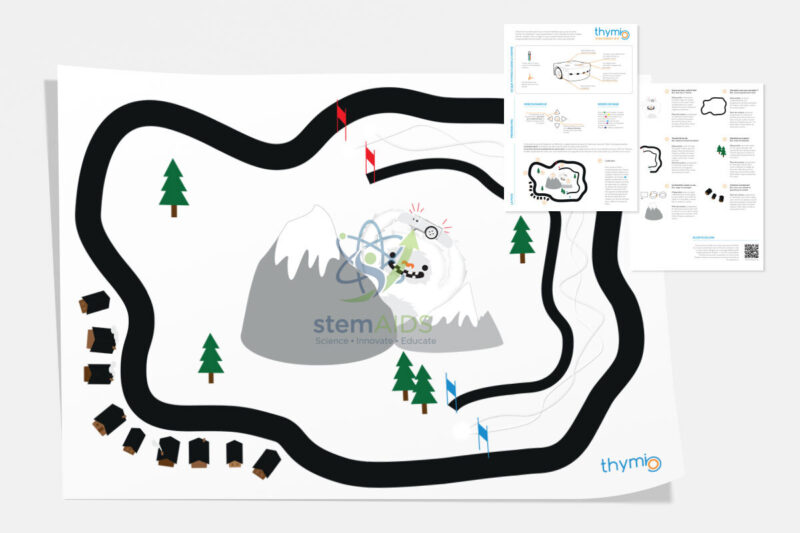
Thymio School Track
$6.09
Quick Answer: Thymio School Track is a printed activity track laid on a table or floor for the Thymio educational robot to drive on. The Thymio school track gives line-following, route-planning and sensor challenges a shared surface that the robot’s ground sensors can read.
Why a Printed Track Helps Thymio Lessons
Thymio reads the ground through two infrared sensors on its underside, which measure how much light the surface reflects. Dark printed lines reflect little and pale areas reflect more, so a track with good contrast lets the built-in line-following behaviour work and gives students clean readings to use in their own programs.
Tracks drawn by hand often fail because marker lines are too thin, too pale or too shiny. A printed track keeps line width and contrast the same on every table, so when a robot leaves the line, the class knows to look for the problem in the code rather than in the surface.
The product name does not describe the layout, theme or sheet size of the print, so check these against the space on your tables or floor when ordering. Lay the Thymio school track flat and weigh down the corners if it curls, since a wave in the surface lifts the sensors and changes the reading.
Looking After the Track
- Roll the track rather than folding it; creases leave raised ridges that the robot can misread.
- Keep shoes off the track when it is on the floor, and wipe off dust with a dry cloth.
- Store it away from direct sunlight so the dark print does not fade and lose contrast.
Track-Based Challenges
- Running the built-in line-following behaviour and watching the ground-sensor LEDs change
- Writing a line-follower in VPL or Scratch and tuning it so the robot keeps the line on bends
- Timed laps to compare different programs
- Steering the robot round the course with the infrared remote before automating the route
Specifications
| Item | Printed activity track for Thymio robots |
| Read by | Thymio ground sensors (reflected infrared) |
| Surface | Table or floor, laid flat |
| Activities | Line-following, routes, stopping and turning challenges |
| Layout, theme and size | Confirm at enquiry |
Why Choose LabEquip
Schools usually order the track with their first robots, so that line-following work has a reliable surface from the first lesson. LabEquip supplies it with the Robot Thymio II and the Thymio IR Remote Control in the General Lab Products range, and quantities per classroom can be arranged through the contact page.
Frequently Asked Questions
How does Thymio follow the line on the track?
Two infrared ground sensors under the front of the robot measure reflected light. Over a dark line the reading drops, and the robot steers to keep the line under its sensors.
Can the track be used with other robots?
The track is designed for Thymio. Other line-following robots that read a dark line on a light surface may work on it too, depending on how their sensors are spaced.
Why does the robot lose the line?
Common causes are driving too fast for the bends, a curled or creased track, strong sunlight on the surface, or dirty sensor windows. Slowing the motor speed in the program is usually the first fix to try.
Can students draw their own tracks too?
Yes, with thick black tape or a broad black marker on white paper. Comparing a home-made track with the printed one is a good way to show how contrast and line width affect the sensors.
Should the track go on the floor or on a table?
Either works. On a table, keep the robot away from the edge or add a border, since Thymio can fall off; on the floor, choose a smooth, hard surface so the track lies flat.
Is the track suitable for young children?
Yes. Younger pupils can use it with the robot’s built-in behaviours or the remote control, and older students can use the same track for their own programs, so one track serves several age groups.
Last Updated: September 2026
You must be logged in to post a review.
Bestsellers




Reviews
There are no reviews yet.