
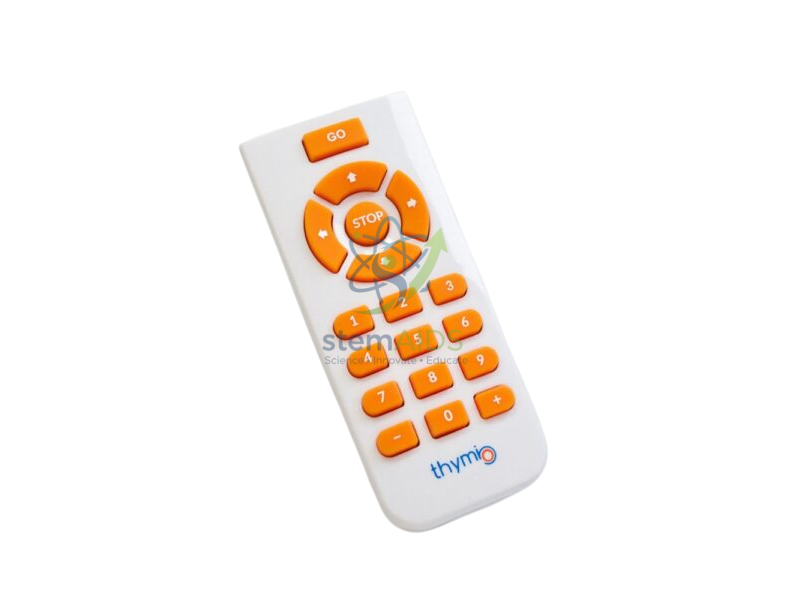
The StemAids Thymio IR Remote Control is a compact and easy-to-use infrared remote designed for controlling the Thymio educational robot. It helps students, teachers, and beginners interact with Thymio without needing a computer or tablet for every basic movement activity.
This remote control is useful for STEM classrooms, robotics workshops, coding demonstrations, home learning, and beginner robotics sessions. It allows learners to explore robot movement, behavior, and programmed responses in a simple and hands-on way.
Product Description
The StemAids Thymio IR Remote Control allows users to operate a compatible Thymio robot using infrared commands. It is especially useful in the robot’s basic purple “obedient” mode, where the robot responds to remote-control movement commands.
For more advanced learners, the remote can also be used in programming activities. When students work with text-based programming, they can create custom reactions for remote-control button presses, such as changing LED colors, playing sounds, moving in different patterns, or triggering specific robot behaviors.
Its lightweight design and simple button layout make it suitable for children, beginners, teachers, and workshop facilitators. It supports interactive learning by making robot control immediate, visible, and easy to understand.
Key Features
- Infrared remote control for Thymio robot
- Supports basic movement control in Thymio’s purple “obedient” mode
- Can be used in programming activities to trigger custom robot reactions
- Helps control movements, colors, sounds, and programmed behaviors
- Compact, lightweight, and easy to carry
- Beginner-friendly button layout
- Useful for STEM education, robotics demonstrations, and classroom activities
- Allows robot interaction without using a computer or tablet for basic control
Product Specifications
Product Name: Thymio IR Remote Control
Brand: StemAids
Product Type: Infrared robot remote control
Compatible With: Thymio educational robot
Control Technology: Infrared / IR communication
Battery Type: CR2025 button cell battery
Approximate Dimensions: 8.6 × 4 × 0.7 cm
Approximate Weight: 14 g without battery
Primary Use: Remote operation of Thymio robot
Learning Use: Robotics control, STEM activities, coding demonstrations, programmed behavior testing
User Level: Beginner to advanced
Recommended Environment: Classroom, STEM lab, robotics club, workshop, home learning
Package Includes: 1 × Thymio IR Remote Control
How to Use
- Make sure your Thymio robot is powered on and has enough battery.
- Insert or check the CR2025 battery in the IR remote control.
- Point the remote control toward the Thymio robot’s infrared receiver.
- Select the purple “obedient” mode on Thymio for basic remote movement control.
- Press the remote buttons to move, rotate, or control the robot.
- For advanced activities, open your Thymio programming environment and create actions linked to remote-control button events.
- Test the program by pressing remote buttons and observing the robot’s response.
- Store the remote safely after use and remove the battery if it will not be used for a long time.
Why Choose StemAids Thymio IR Remote Control?
StemAids provides education-focused robotics accessories that support hands-on STEM learning. The StemAids Thymio IR Remote Control is a simple but powerful classroom accessory that helps learners understand robot control, input commands, programmed actions, and cause-and-effect behavior.
It is ideal for teachers who want to demonstrate robot movement quickly, students who are new to robotics, and advanced learners who want to create custom remote-triggered programs.
Safety and Care Instructions
Use the remote under adult or teacher supervision when working with young learners. Keep the CR2025 button cell battery away from children. Do not expose the remote to water, heat, fire, or strong impact. Store it in a dry place after use.
FAQ
Q1. What is the StemAids Thymio IR Remote Control?
It is an infrared remote control used to operate and interact with the Thymio educational robot.
Q2. Which robot is it compatible with?
It is designed for use with the Thymio robot.
Q3. Can it control Thymio without a computer?
Yes. In basic use, it can control Thymio without needing a computer or tablet.
Q4. Which Thymio mode works with the remote?
The remote is commonly used with Thymio’s purple “obedient” mode for movement control.
Q5. Can it be used for programming?
Yes. Advanced users can program Thymio to react to remote-control button presses.
Q6. What battery does it use?
It uses a CR2025 button cell battery.
Q7. Is it suitable for classroom use?
Yes. It is suitable for STEM classrooms, robotics labs, coding workshops, and demonstrations.
Q8. Is it suitable for beginners?
Yes. Its simple button-based control makes it suitable for beginners and children under supervision.




Reviews
There are no reviews yet.