
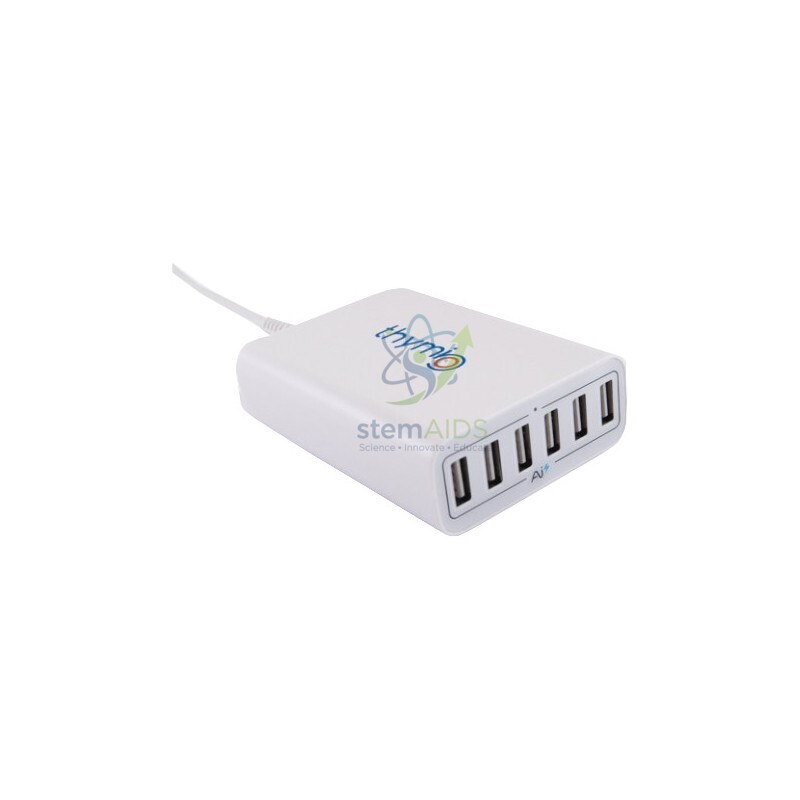
The StemAids Thymio Loading Hub is a practical charging and organization accessory designed for schools, STEM labs, robotics clubs, makerspaces, and training centers that use Thymio educational robots. It helps keep multiple Thymio robots organized, accessible, and ready for classroom activities.
Thymio is an open-source educational robot designed by researchers from EPFL in collaboration with ECAL and produced by Mobsya, making it widely used for STEAM and programming education. The StemAids Thymio Loading Hub is made to support that learning environment by reducing cable clutter and helping teachers manage robot charging more easily.
Product Description
The StemAids Thymio Loading Hub is designed to simplify charging management for Thymio robots. Instead of using separate chargers or scattered USB connections, this hub provides a centralized place to connect and charge robots between lessons.
It is especially useful in classrooms where several Thymio robots are used at the same time. Teachers and lab managers can place the robots near one charging point, keep cables better organized, and prepare devices before the next robotics or coding session.
The hub is suitable for:
STEM classrooms, robotics labs, coding workshops, teacher training centers, school computer labs, makerspaces, and Thymio robot storage areas.
Product Specifications
| Specification | Details |
|---|---|
| Brand | StemAids |
| Product Name | Thymio Loading Hub |
| Product Type | Charging and organization hub for Thymio robots |
| Compatible Device | Thymio / Thymio II educational robots |
| Main Function | Centralized charging support for multiple Thymio robots |
| Connection Type | USB-based charging connection |
| Power Use | Designed for powered charging setup |
| Application | Classroom, lab, training, and robotics storage use |
| Cable Management | Helps reduce scattered charging cables |
| User Level | Teachers, trainers, lab managers, students under supervision |
| Package Includes | 1 × StemAids Thymio Loading Hub |
Note: Exact port count, adapter rating, and cable type may vary by model or supply batch. Always check the product label and included adapter before use.
Key Features
Centralized charging setup: Helps keep Thymio robots connected in one organized place.
Classroom-friendly design: Ideal for schools and robotics labs using multiple robots.
Reduced cable clutter: Makes storage and charging easier to manage.
Supports STEM learning: Helps prepare robots before coding, programming, and robotics sessions.
Easy to use: Connect the hub to power, plug in the robots, and allow them to charge.
Trusted brand: Supplied under the StemAids brand for educational robotics users.
How to Use the StemAids Thymio Loading Hub
- Place the Thymio Loading Hub on a clean, dry, and stable surface.
- Connect the hub to its recommended power adapter or power source.
- Make sure the hub is switched on, if the model includes a power switch.
- Turn off the Thymio robots before charging for better charging efficiency.
- Connect each Thymio robot using the correct USB charging cable.
- Check that each robot is properly connected.
- Allow the robots to charge before classroom use.
- Disconnect robots carefully after charging.
- Store cables neatly to avoid damage.
Safety and Care Instructions
Use the StemAids Thymio Loading Hub only with compatible Thymio robots and suitable USB charging cables. Keep the hub away from water, dust, heat, and direct sunlight. Do not overload the hub beyond its rated capacity. Do not use damaged cables, loose connectors, or damaged power adapters. Adult supervision is recommended in classrooms and student labs.
FAQ
Q1. What is the StemAids Thymio Loading Hub used for?
The StemAids Thymio Loading Hub is used to organize and charge multiple Thymio robots from one central charging area.
Q2. Is this hub compatible with Thymio robots?
Yes. It is designed for use with compatible Thymio / Thymio II educational robots.
Q3. Can I charge more than one Thymio robot at the same time?
Yes, the hub is intended for multi-robot charging management. The exact number of robots depends on the model’s port count and power rating.
Q4. Does it charge Thymio faster?
Charging speed depends on the power source, adapter rating, cable quality, and robot condition. For best results, use the recommended power adapter and turn off the robot while charging.
Q5. Can students use the hub?
Students can connect robots under teacher or adult supervision. Setup, power connection, and cable checks should be handled by an adult or lab manager.
Q6. Is it suitable for schools?
Yes. It is especially useful for schools, STEM labs, robotics clubs, and makerspaces that use multiple Thymio robots.
Q7. What should I do if a robot is not charging?
Check the cable, port, power adapter, and robot connection. Try another cable or another port. If the robot still does not charge, inspect the robot battery or contact technical support.
Q8. What is included in the package?
The package includes 1 StemAids Thymio Loading Hub. Cables or adapters may vary depending on the product bundle.




Reviews
There are no reviews yet.