
In Stock
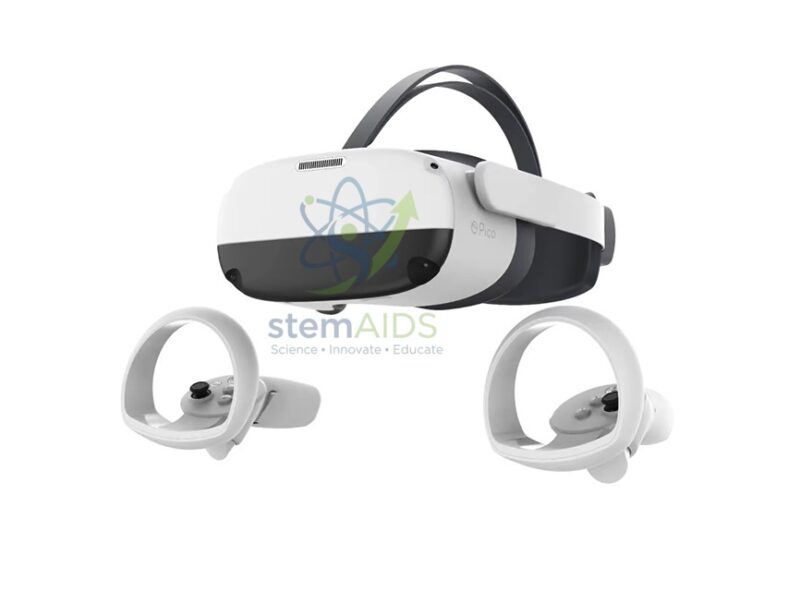
Pico Neo 3
₹26,301.00
The StemAids Pico Neo 3 is an advanced all-in-one virtual reality headset designed for immersive learning, STEM education, VR training, digital simulations, classroom demonstrations, enterprise training, research labs, skill development centers, and interactive 3D experiences. It offers standalone VR performance with inside-out tracking, high-resolution visuals, wireless connectivity, and ergonomic design for institutional and educational use.
Powered by the Qualcomm Snapdragon XR2 platform, the Pico Neo 3 provides strong processing performance for VR applications, training modules, simulation content, 360° videos, virtual laboratories, design visualization, and interactive digital learning. It is suitable for schools, colleges, universities, innovation labs, STEM labs, technical institutes, and training organizations.
Product Overview
The Pico Neo 3 supplied by StemAids is a standalone 6DoF VR headset that does not require external tracking sensors for normal operation. Its four built-in tracking cameras support inside-out tracking, allowing users to move and interact naturally inside virtual environments.
With a 4K LCD display, 6GB RAM, 256GB storage, Wi-Fi 6, Bluetooth 5.1, integrated stereo speakers, dual microphones, and 6DoF controllers, the Pico Neo 3 is suitable for immersive classroom learning, virtual tours, professional simulations, safety training, skill practice, and digital content exploration.
Key Features
- All-in-One VR Headset: Standalone design supports VR applications without requiring a PC for basic headset use.
- Qualcomm Snapdragon XR2 Platform: Delivers strong processing power for immersive VR content and enterprise applications.
- 4K LCD Display: Offers 3664 x 1920 total resolution for clear and detailed visual experiences.
- Adjustable Refresh Rate: Supports 72Hz, 90Hz, and up to 120Hz depending on model, software, and setup.
- Inside-Out 6DoF Tracking: Uses four built-in cameras for headset and controller tracking without external base stations.
- 6DoF Controllers: Includes motion controllers for interactive VR navigation, selection, training, and simulation tasks.
- Large Storage Capacity: 6GB RAM and 256GB UFS 3.0 storage support multiple VR apps and learning content.
- Wi-Fi 6 and Bluetooth 5.1: Supports modern wireless connectivity for content access and device pairing.
- Integrated Audio: Built-in stereo speakers and dual microphones support immersive sound and communication.
- Balanced Rear Battery Design: Helps improve comfort during classroom and training sessions.
Product Specifications
| Product Name | Pico Neo 3 |
|---|---|
| Supplied By | StemAids |
| Product Type | Standalone 6DoF Virtual Reality Headset |
| Processor Platform | Qualcomm Snapdragon XR2, octa-core 64-bit processor |
| GPU | Adreno 650 |
| RAM | 6GB LPDDR4X |
| Storage | 256GB UFS 3.0 |
| Display | 5.5 inch LCD display |
| Resolution | 4K resolution, 3664 x 1920 pixels total |
| Refresh Rate | 72Hz / 90Hz / 120Hz depending on model, application, and system setup |
| Field of View | Approx. 98° |
| Lens Type | Fresnel lens |
| IPD Adjustment | Three-stage adjustment: 58mm, 63.5mm, and 69mm |
| Tracking | Inside-out 6DoF optical tracking with four ambient cameras |
| Controllers | Two 6DoF motion controllers with tracking rings and control buttons |
| Audio | Integrated stereo speakers with 3D spatial audio support |
| Microphone | Omni-directional dual microphones with noise and echo suppression support |
| Battery | 5300mAh headset battery |
| Battery Life | Approx. 2.5 to 3 hours of active use depending on application and settings |
| Wireless Connectivity | Wi-Fi 6, 2.4GHz/5GHz dual band, and Bluetooth 5.1 |
| PC VR Support | Supported on compatible models through wired DisplayPort/USB connection or wireless streaming depending on setup |
| Application Area | STEM labs, VR classrooms, ICT labs, simulation centers, training rooms, research labs, and innovation spaces |
How to Use the StemAids Pico Neo 3
- Charge the Headset: Fully charge the Pico Neo 3 headset and controller batteries before classroom or training use.
- Prepare a Safe Area: Clear the play area and remove obstacles, sharp objects, loose cables, and fragile items.
- Power On the Headset: Press the power button and follow the on-screen setup instructions.
- Pair the Controllers: Turn on both 6DoF controllers and pair them with the headset if required.
- Set the Boundary: Configure the safe play boundary or seated mode as per the available classroom or lab space.
- Adjust Fit and IPD: Adjust the head strap and IPD setting for a comfortable and clear viewing experience.
- Connect to Wi-Fi: Connect the headset to a secure Wi-Fi network for content access, app installation, or streaming use.
- Open VR Content: Launch the required educational app, simulation, virtual lab, 360° video, or training module.
- Use Controllers: Use the motion controllers to select, move, interact, draw, point, or perform tasks inside VR.
- Take Breaks: Use VR in supervised sessions and allow regular breaks to reduce eye strain or discomfort.
Educational and Training Benefits
The StemAids Pico Neo 3 helps institutions create immersive, interactive, and experience-based learning environments. It allows learners to explore virtual spaces, understand complex concepts visually, and practice skills in safe simulated conditions.
- Supports immersive STEM, science, and technology learning
- Useful for virtual laboratories, 3D models, simulations, and virtual field trips
- Helps students visualize complex systems, machines, structures, and environments
- Supports safety training, skill practice, and scenario-based learning
- Encourages active participation and experiential learning
- Useful for engineering, medical, architecture, robotics, and design education
Applications
- Virtual reality classrooms
- STEM and innovation labs
- Virtual science laboratories
- Engineering and industrial training
- Medical and healthcare visualization
- Architecture and design walkthroughs
- Robotics and automation simulations
- Safety training and skill development
- 360° educational video viewing
- Interactive digital learning programs
Why Choose StemAids Pico Neo 3?
StemAids provides practical educational technology solutions for STEM labs, ICT rooms, VR classrooms, innovation labs, and institutional training environments. The Pico Neo 3 is suitable for organizations that need a standalone VR headset for immersive learning, simulation, content viewing, and interactive training.
With Snapdragon XR2 performance, 4K visual output, 6DoF inside-out tracking, motion controllers, Wi-Fi 6 connectivity, large storage, and balanced headset design, this VR system helps schools and institutions deliver modern experiential learning in a structured and engaging way.
Safety and Maintenance Guidelines
- Use VR only in a clear and safe area free from obstacles.
- Use under teacher, trainer, or staff supervision in educational environments.
- Stop using the headset if the user feels dizziness, nausea, eye strain, headache, or discomfort.
- Take regular breaks during VR sessions, especially for students and first-time users.
- Keep headset lenses clean using a soft microfiber cloth.
- Do not expose the headset, controllers, or charging accessories to water, dust, heat, or direct sunlight.
- Clean face cushions regularly in shared classroom or training environments.
- Use only compatible chargers, cables, apps, and accessories.
- Store the headset and controllers safely after use.
- Follow age suitability, content suitability, and institutional safety guidelines before classroom use.
Google E-E-A-T Focus
This product content is prepared for school procurement teams, STEM coordinators, ICT administrators, VR lab managers, training centers, research departments, and institutional buyers. It focuses on verified specifications, practical educational use, safe operation, device compatibility, and immersive learning value to support Google E-E-A-T principles of experience, expertise, authoritativeness, and trustworthiness.
Frequently Asked Questions
1. What is the StemAids Pico Neo 3 used for?
It is used for virtual reality learning, STEM simulations, 3D visualization, training modules, virtual labs, 360° videos, interactive lessons, and immersive education.
2. Is the Pico Neo 3 suitable for schools and colleges?
Yes, it is suitable for schools, colleges, universities, STEM labs, ICT rooms, innovation labs, training centers, and simulation environments.
3. Does the Pico Neo 3 require a computer?
It works as a standalone VR headset for compatible apps and content. Some PC VR experiences may require a compatible VR-ready computer and supported connection method.
4. What is the display resolution?
The Pico Neo 3 has a 4K LCD display with a total resolution of 3664 x 1920 pixels.
5. What processor does it use?
The headset is powered by the Qualcomm Snapdragon XR2 platform with Adreno 650 graphics.
6. Does it support 6DoF tracking?
Yes, the Pico Neo 3 supports 6DoF headset and controller tracking using inside-out optical tracking with four built-in cameras.
7. What is the battery capacity?
The headset includes a 5300mAh battery and provides approximately 2.5 to 3 hours of active use depending on application and settings.
8. Does it support Wi-Fi?
Yes, the Pico Neo 3 supports Wi-Fi 6 with 2.4GHz and 5GHz dual-band connectivity.
9. Can it be used for STEM lab demonstrations?
Yes, it is useful for STEM labs because it supports virtual experiments, 3D models, robotics simulations, design visualization, and immersive learning modules.
10. Is VR safe for students?
VR can be used safely when supervised properly, with age-appropriate content, a clear play area, correct headset fitting, hygiene cleaning, and regular breaks.
SEO Keywords
Pico Neo 3, StemAids Pico Neo 3, Pico Neo 3 VR headset, standalone VR headset for schools, virtual reality headset for education, STEM lab VR headset, 6DoF VR headset, Snapdragon XR2 VR headset, 4K VR headset, VR headset for training, VR lab equipment, immersive learning headset, Pico Neo 3 for classroom, virtual reality training headset.
You must be logged in to post a review.
Bestsellers





Reviews
There are no reviews yet.