








In Stock
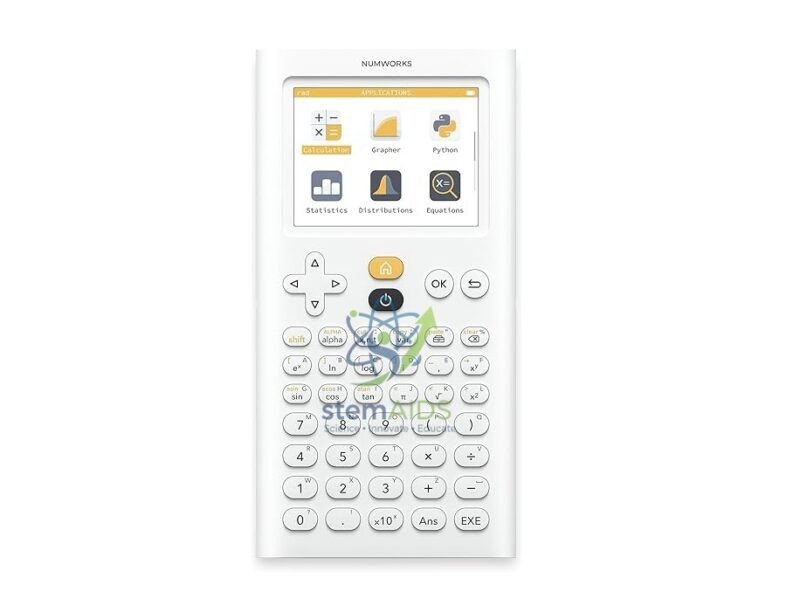
NumWorks Python Calculator
₹2,315.00
Quick Answer: The NumWorks Python Calculator is a graphing calculator from the French company NumWorks that includes a Python programming app. Students use the NumWorks graphing calculator to plot functions, solve equations, analyse data and write short Python scripts on one handheld device.
A Graphing Calculator That Runs Python
NumWorks organises the calculator into apps chosen from a home screen: calculation, function graphing, equation solving, statistics, probability, regression and sequences, among others. The Python app gives students a code editor and a shell on the calculator itself, so short programs, such as a loop that lists prime numbers or a simulation of dice throws, run without a computer.
Python on a calculator links maths lessons with programming lessons: students can check a formula numerically, then write the algorithm that produces it. NumWorks runs MicroPython, a version of Python for small devices that covers the core language and modules such as math and random, but not the large libraries used on desktop computers.
The calculator has an exam mode that restricts it for supervised tests. Whether a graphing or programmable calculator is allowed in a particular examination depends on the rules of that exam board, so check them before buying for exam use.
Specifications
| Brand | NumWorks |
| Type | Graphing calculator with Python app |
| Main apps | Calculation, graphing, equations, statistics, probability, regression, sequences, Python |
| Programming | MicroPython on the calculator |
| Exam use | Exam mode available; approval depends on each exam board |
Uses in Maths, Science and Computing
- Plotting and comparing functions in algebra and calculus lessons
- Statistics and regression on data collected in science practicals
- First programming exercises in Python, from loops to simple simulations
- Probability experiments, simulating coin or dice throws with the random module
Care & Handling
- Use a protective cover when the calculator is carried in a bag, to protect the screen from pressure.
- Recharge it through its USB connection from a computer or low-power charger, and keep it out of hot cars and sunny windowsills.
- Install software updates only from NumWorks’ official website, so all class calculators run the same version.
- Clean the keypad and screen with a dry, soft cloth, without solvents.
Why Choose LabEquip
Maths departments and computing teachers order graphing calculators in class sets so every student learns on the same model. LabEquip lists the NumWorks calculator in General Lab Products, with related resources in the Mathematics School Lab range; class orders can be sent through the contact page.
Frequently Asked Questions
Can the NumWorks calculator really run Python?
Yes. It has a Python app with a code editor and shell, based on MicroPython. Students can write, save and run short programs using core Python syntax and modules such as math and random.
Is the NumWorks allowed in exams?
It has an exam mode for supervised tests, but approval of graphing and programmable calculators is decided by each exam board. Check the current calculator rules for the specific exam before relying on it.
How is the NumWorks different from a scientific calculator?
A scientific calculator evaluates expressions line by line. A graphing calculator like the NumWorks also plots functions, solves equations, fits regression models to data and, in this case, runs Python programs.
Can students transfer programs from a computer?
Yes. NumWorks provides an online workspace where scripts can be written and then sent to the calculator over a USB connection from a supported web browser.
How is the calculator powered?
It runs on a rechargeable battery charged through its USB connection. Charging a class set before a test avoids flat batteries in the middle of an assessment.
Is the NumWorks suitable for beginners in programming?
Yes. The Python app starts from a blank script and simple commands, and teachers often begin with print statements and loops before moving to functions. Seeing each result on the calculator screen helps students understand what every line does.
Last Updated: September 2026
You must be logged in to post a review.
Bestsellers




Reviews
There are no reviews yet.