






In Stock
Mini 6 in 1 Memory Card Reader
₹450.00
Quick Answer: The mini 6 in 1 memory card reader is a small stick-shaped USB device with a card slot, used to read and write memory cards on a computer. The phrase 6 in 1 means the reader accepts six card formats, so one 6 in 1 memory card reader covers cards from several kinds of device.
One Small Reader, Several Card Types
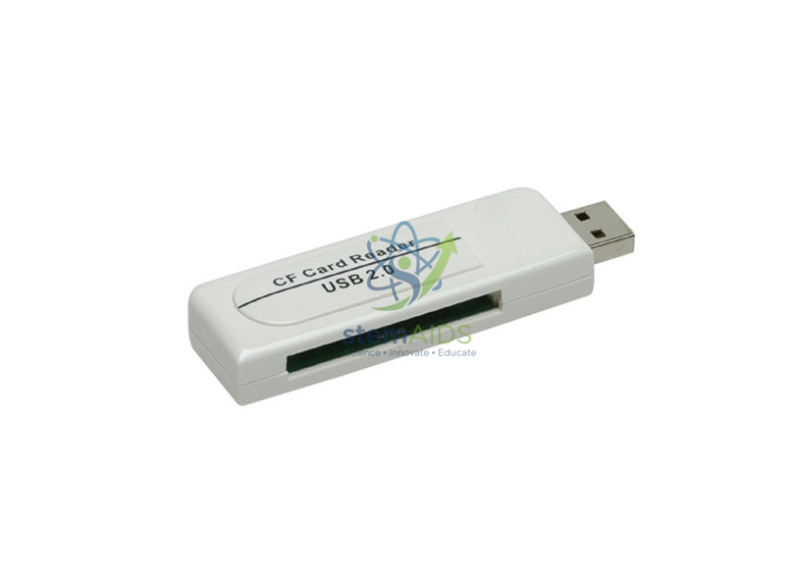
The listing photo shows a white reader about the size of a flash drive, with a full-size USB plug at one end and a card slot along its body. Plugged into a computer, it appears as a removable drive when a card is inserted, and files can be copied or deleted as from any drive.
Readers described as 6 in 1 usually cover the SD family (SD, SDHC, SDXC), microSD and one or two older formats such as MMC, but the exact six vary by model; confirm them at enquiry if you rely on a particular card. Whether the reader runs at USB 2.0 or USB 3.0 speed also varies between models.
Many compact readers read only one card at a time. A reader is handy for computers without a built-in slot and for microSD cards from action cameras, drones or single-board computers. Pair it with an SD memory card for cameras and loggers.
When a Reader Helps
- Copying field-trip photos from a camera card to a school computer
- Reading microSD cards from action cameras or trail cameras
- Collecting data from loggers that save to memory cards
- Transferring files on computers with no built-in card slot
Specifications
| Type | Mini USB memory card reader |
| Formats | Six card formats (as titled) |
| Form | Compact stick with USB plug and card slot (as pictured) |
| Computer connection | USB |
| Exact card list and USB version | Confirm at enquiry |
Care & Handling
- Eject the card in the operating system before pulling the reader out.
- Insert cards the right way round without forcing; a card that will not slide in is probably the wrong format or upside down.
- Keep the reader in a small pouch to keep dust out of the slot.
Why Choose LabEquip
Teachers and technicians who handle cards from several cameras and loggers buy compact readers so every department has one to hand. You will find the reader in General Lab Products; order quantities through the LabEquip contact page.
Frequently Asked Questions
What does ‘6 in 1’ mean?
It means the reader accepts six memory card formats. The SD family and microSD are the most common among them; the exact list varies by model.
Can it read two cards at the same time?
Most compact multi-format readers read one card at a time. Insert one card, copy what you need, eject it, then insert the next.
Does it need a driver?
Card readers use the standard USB storage support built into current Windows, macOS, Linux and ChromeOS, so they normally work as soon as they are plugged in.
Why is copying slow?
Speed depends on the card’s own read speed and on the USB version of the reader and the port. A basic card or a USB 2.0 connection limits large video transfers.
Can it read microSD without an adapter?
If microSD is one of its six formats, yes, through its own slot. Otherwise use a microSD-to-SD adapter in the SD slot.
Is it safe to remove the card while files are copying?
No. Wait until copying has finished and eject the card in the operating system first, otherwise files on the card can be damaged.
Last Updated: September 2026
You must be logged in to post a review.
Bestsellers




Reviews
There are no reviews yet.