

In Stock
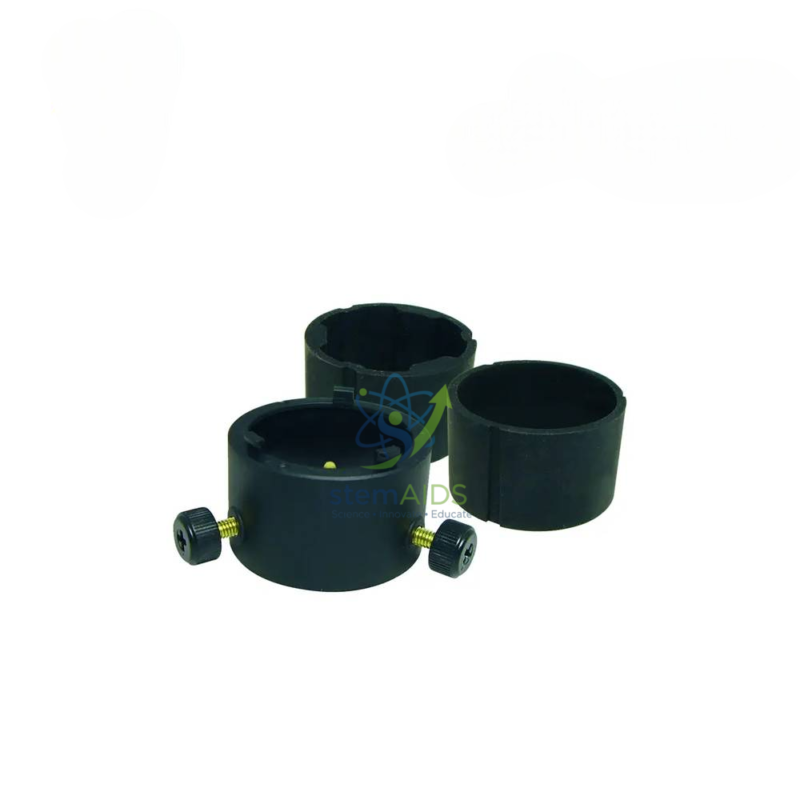
Microscopy adapter for Aver F50 visualizer
₹1,000.00
The StemAids Microscopy Adapter for AVer F50 Visualizer is a practical visualizer accessory designed to connect a compatible AVer F50 document camera with a microscope. It helps teachers, trainers, and laboratory instructors display microscopic observations on a projector, monitor, interactive panel, or smartboard for whole-class viewing.
This adapter is especially useful for biology labs, science classrooms, STEM labs, medical training rooms, life science demonstrations, and practical laboratory teaching where microscope images need to be shown clearly to multiple students at the same time.
Product Overview
The microscopy adapter acts as a connector between the microscope eyepiece area and the AVer F50 visualizer camera head. Once fitted properly, it allows the visualizer to capture the microscope view and display it through the connected classroom AV system.
Instead of students viewing a specimen one by one through a microscope, the teacher can use the adapter with the AVer F50 visualizer to show slides, cells, tissues, microorganisms, prepared specimens, and laboratory observations on a large screen.
Key Features
- Designed for AVer F50 Visualizer: Suitable for use with compatible AVerVision F50 document camera models.
- Microscope Connectivity: Helps connect the visualizer camera head with a compatible microscope eyepiece.
- Classroom Demonstration Support: Allows microscope observations to be displayed on a large screen.
- Useful for Biology and STEM Labs: Suitable for specimen viewing, slide observation, and science practicals.
- Easy Installation: Simple attachment method for classroom and laboratory use.
- Reusable Accessory: Can be used repeatedly in science demonstrations and practical sessions.
- Improves Student Visibility: Helps the whole class observe the same microscopic image at one time.
- Supports Digital Teaching: Useful for smart classrooms, projector-based teaching, and interactive displays.
Product Specifications
| Product Name | Microscopy Adapter for AVer F50 Visualizer |
|---|---|
| Brand | StemAids |
| Product Type | Microscope Adapter / Visualizer Accessory |
| Compatible Visualizer | AVerVision F50 / F50-8M and compatible AVer F-Series models, subject to model confirmation |
| Reference Part Number | VISIFSEMA or compatible equivalent, depending on supply configuration |
| Use With | Compatible microscopes and AVer visualizer camera heads |
| Function | Connects microscope view to the AVer visualizer for large-screen display |
| Installation Type | Manual attachment to microscope eyepiece / visualizer camera head |
| Application Area | Biology labs, science classrooms, STEM labs, medical training rooms, and research demonstrations |
| Recommended Users | Science teachers, biology instructors, lab assistants, STEM trainers, and institutional buyers |
How to Use the Microscopy Adapter for AVer F50 Visualizer
- Check Compatibility: Confirm that the adapter is suitable for the AVer F50 visualizer and the microscope eyepiece size.
- Prepare the Microscope: Place the prepared slide on the microscope stage and adjust the microscope focus normally.
- Attach the Adapter: Fix the microscopy adapter to the microscope eyepiece or camera connection point as per the fitting design.
- Connect the Visualizer: Align the AVer F50 visualizer camera head with the adapter so it can capture the microscope image.
- Connect to Display: Connect the visualizer to a projector, monitor, computer, interactive panel, or smartboard.
- Adjust Focus: Fine-tune the microscope focus and visualizer focus until the specimen image appears clear.
- Use Zoom Carefully: Use the microscope magnification and visualizer zoom to enlarge details without losing clarity.
- Display to Students: Show the microscopic image to the full class for discussion, explanation, and observation.
Educational Benefits
The StemAids Microscopy Adapter for AVer F50 Visualizer helps make microscopic observation more collaborative and classroom-friendly. It allows teachers to explain microscopic structures while all students view the same specimen at the same time.
- Supports biology and life science practical demonstrations
- Helps students observe cells, tissues, microorganisms, and prepared slides clearly
- Reduces the need for every student to view the same slide individually
- Improves classroom discussion during microscope-based lessons
- Useful for recording microscope demonstrations with compatible visualizer systems
- Supports smart classroom and STEM lab teaching methods
Applications
- Biology laboratory teaching
- Microscope slide demonstration
- Life science classroom practicals
- STEM lab observation activities
- Medical and nursing training demonstrations
- Science fair and exhibition presentations
- Digital classroom microscope display
- Interactive panel and projector-based learning
- Laboratory training and specimen explanation
Why Choose StemAids Microscopy Adapter for AVer F50 Visualizer?
StemAids provides practical educational technology accessories for science labs, STEM classrooms, ICT rooms, and institutional learning spaces. The Microscopy Adapter for AVer F50 Visualizer is a useful accessory for schools and laboratories that want to convert microscope observations into large-screen visual demonstrations.
It helps science teachers make biology practicals more visible, interactive, and easier to explain. When used with a compatible AVer F50 visualizer and microscope, this adapter supports clearer classroom observation and improves student engagement during laboratory sessions.
Safety and Maintenance Guidelines
- Use only with compatible AVer visualizers and microscope eyepieces.
- Do not force the adapter onto an incompatible microscope or camera head.
- Handle the adapter carefully to avoid scratches, cracks, or alignment issues.
- Keep the adapter clean and free from dust before use.
- Do not touch optical surfaces with fingers if the adapter includes optical elements.
- Store the adapter in a safe box or pouch after use.
- Use under teacher or laboratory staff supervision in school science labs.
- Check alignment and fitting before starting classroom demonstration.
Google E-E-A-T Focus
This product content is prepared for school procurement teams, science teachers, biology lab coordinators, STEM educators, AV integrators, and institutional buyers. It focuses on product compatibility, practical classroom use, safe handling, laboratory application, and educational value to support Google E-E-A-T principles of experience, expertise, authoritativeness, and trustworthiness.
Frequently Asked Questions
1. What is the StemAids Microscopy Adapter for AVer F50 Visualizer used for?
It is used to connect a compatible microscope with an AVer F50 visualizer so the microscope image can be displayed on a projector, monitor, interactive panel, or smartboard.
2. Is this adapter compatible with AVer F50?
Yes, the adapter is intended for compatible AVer F50 visualizer models. Compatibility should be confirmed with the exact visualizer and microscope model before purchase.
3. Can it be used with AVer F50-8M?
AVer lists a microscope adapter as an optional accessory for the F50-8M with part number VISIFSEMA. Model compatibility should still be verified before supply.
4. Can the adapter be used with other AVer visualizers?
Some AVer microscope adapter listings mention compatibility with models such as AVerVision F30, F50, and W30. Use with other models should be confirmed before installation.
5. Does this adapter magnify the specimen?
The microscope provides the main magnification. The adapter helps the visualizer capture and display the microscope image on a larger screen.
6. Is it useful for biology practicals?
Yes, it is useful for biology practicals because teachers can show cells, tissues, microorganisms, and prepared slides to the whole class.
7. Can students see the microscope view on a projector?
Yes, when the adapter is used with a compatible AVer F50 visualizer and projector setup, the microscope view can be shown on a large projection screen.
8. Does it require software?
Basic display depends on the visualizer and connection setup. Recording, annotation, or image capture may require compatible AVer software.
9. Is professional installation required?
It is generally simple to attach, but first-time setup should be done by a teacher, lab assistant, or AV technician to ensure correct alignment.
10. How should the adapter be stored?
Store the adapter in a clean, dry, and protected place after use to prevent dust, scratches, and damage.
SEO Keywords
Microscopy Adapter for AVer F50 Visualizer, StemAids microscopy adapter, AVer F50 microscope adapter, VISIFSEMA microscope adapter, AVerVision F50 adapter, document camera microscope adapter, microscope adapter for visualizer, biology lab visualizer adapter, STEM lab microscope adapter, classroom microscope display adapter, AVer document camera accessory, microscope adapter for smart classroom, visualizer microscope connector.
You must be logged in to post a review.
Bestsellers




Reviews
There are no reviews yet.