
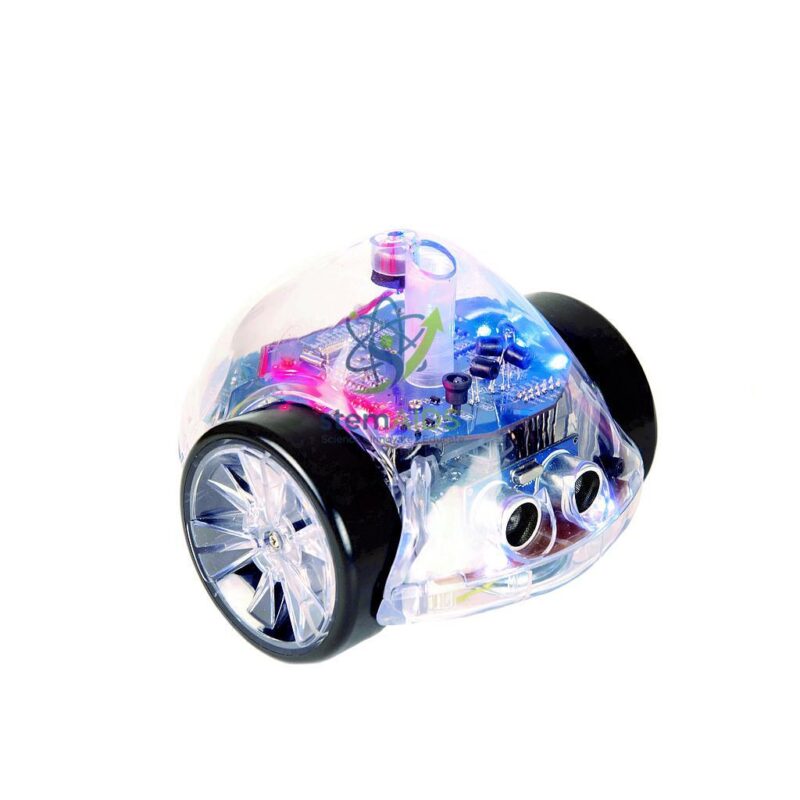
The StemAids Ino-bot Robot is an advanced programmable educational robot designed to help students move beyond basic coding and explore real robotics concepts through hands-on activities. It introduces learners to programming, sensors, lights, sounds, drawing, route planning, debugging, and problem-solving in an engaging, classroom-friendly format.
With Bluetooth connectivity, a transparent body, programmable LEDs, built-in sensors, sound output, and a pen holder for drawing shapes and paths, the StemAids Ino-bot Robot gives students a practical way to understand how code controls real-world actions.
This robot is ideal for schools, STEM labs, coding clubs, robotics workshops, libraries, makerspaces, and home learning environments where students are ready for more advanced programming challenges.
Key Features
- Advanced programmable educational robot for STEM learning
- Bluetooth connectivity for compatible software or app control
- Transparent shell helps learners see internal components
- Programmable RGB LEDs for creative coding activities
- White LED headlights for output-based programming tasks
- Built-in speaker for sounds, notes, and feedback activities
- Pen holder for drawing shapes, paths, and geometry patterns
- Range finder or distance sensor for obstacle-aware programming
- Proximity sensors for detecting nearby objects
- Line follower sensors for tracking paths and classroom challenges
- Rechargeable design for repeated classroom use
- Supports coding, robotics, ICT, math, logic, and problem-solving
Product Specifications
| Brand Name | StemAids |
|---|---|
| Product Name | StemAids Ino-bot Robot |
| Product Type | Bluetooth Programmable Educational Robot |
| Learning Level | Intermediate to advanced STEM and coding activities |
| Connectivity | Bluetooth |
| Programming Method | Compatible Scratch-style software, app-based control, or supported coding platform depending on SKU |
| Robot Body | Transparent shell for visible internal components |
| LED Output | Common versions include 8 programmable RGB LEDs |
| Headlights | Common versions include 2 white LED headlights |
| Sound Output | Built-in speaker for sounds and notes |
| Drawing Feature | Pen holder for drawing shapes, routes, and geometry patterns |
| Sensors | Range finder or distance sensor, proximity sensors, line follower sensors; light and sound sensors may be included depending on model |
| Movement | Forward, backward, left turn, right turn, and programmable movement commands |
| Battery | Rechargeable battery |
| Charging Method | USB charging cable or compatible charging accessory depending on SKU |
| Subjects Supported | Coding, STEM, ICT, robotics, math, geometry, logic, and problem-solving |
| Usage Environment | Indoor classroom, STEM lab, library, coding club, robotics workshop, and home learning |
| Recommended Users | Teachers, students, STEM educators, coding trainers, and robotics clubs |
| Robots Included | One Ino-bot robot unless sold as part of a kit or bundle |
| Accessories Included | May vary by SKU; verify final StemAids package contents before publishing |
Note: Sensor types, software compatibility, accessories, charging cable, age labeling, and package contents may vary by SKU or production batch. Please verify the final StemAids specifications before publishing on packaging, catalogues, or ecommerce listings.
How to Use StemAids Ino-bot Robot
- Fully charge the Ino-bot Robot before classroom use.
- Turn on the robot and place it on a clean, flat indoor surface.
- Connect the robot to the compatible app or programming software using Bluetooth.
- Create a simple movement program using forward, backward, left, and right commands.
- Send the program to the robot and observe the movement.
- Add LED, sound, or sensor commands to make the activity more interactive.
- Insert a pen into the pen holder to draw shapes, paths, angles, or geometry patterns.
- Use sensors to create obstacle detection, line following, or response-based challenges.
- Ask students to test, observe, debug, and improve their program.
- After use, turn off the robot, remove the pen, clean the surface if needed, and store the robot safely.
Classroom Activity Ideas
- Program the robot to draw squares, triangles, and polygons
- Use LEDs to create traffic light or signal activities
- Program sounds to play after completing a task
- Create an obstacle avoidance challenge
- Use line follower sensors to follow a path
- Design a robot maze with sensor-based decisions
- Teach angles, distance, turns, and geometry through movement
- Create a storytelling route with lights and sounds
- Ask students to debug an incorrect program
- Run group challenges with roles such as coder, tester, observer, and debugger
Learning Benefits
The StemAids Ino-bot Robot helps students connect coding with real-world robotics. By programming movement, lights, sounds, sensors, and drawing actions, learners develop a deeper understanding of how inputs, outputs, and algorithms work together.
- Builds computational thinking and algorithmic skills
- Develops logical reasoning and sequencing
- Introduces sensor-based programming
- Supports geometry, distance, direction, and angle learning
- Encourages debugging and problem-solving
- Promotes creativity through lights, sounds, and drawing
- Improves collaboration and STEM confidence
Care and Safety Instructions
- Use the robot only on a clean, dry, flat indoor surface.
- Charge only with the supplied or recommended charging cable.
- Do not expose the robot to water, dust, or extreme heat.
- Remove the pen after drawing activities.
- Do not push, drop, or force the robot while it is moving.
- Adult supervision is recommended for younger learners.
- Store the robot in a clean, dry place after use.
FAQ
What is the StemAids Ino-bot Robot used for?
It is used to teach coding, robotics, sensors, lights, sounds, movement, geometry, drawing, problem-solving, and debugging.
Is Ino-bot suitable for beginners?
It is best suited for learners who are ready to move beyond basic floor robot commands into more advanced programming and robotics activities.
Does the Ino-bot Robot support Bluetooth?
Yes. InO-Bot-style robots commonly use Bluetooth for compatible software or app-based programming.
Can the robot draw shapes?
Yes. Common InO-Bot versions include a pen holder that allows the robot to draw routes, shapes, and geometry patterns.
What sensors does the robot include?
Common versions include range finder or distance sensing, proximity sensors, and line follower sensors. Some versions may also include light and sound sensors. Please verify the final StemAids SKU.
Does it have programmable lights?
Yes. Common InO-Bot versions include programmable RGB LEDs and white LED headlights.
Is the robot rechargeable?
Yes. Common versions include a rechargeable battery.
Can it be used in schools?
Yes. It is suitable for schools, STEM labs, coding clubs, libraries, robotics workshops, and activity centers.
What subjects can it support?
It supports coding, STEM, ICT, robotics, math, geometry, logic, problem-solving, and creative technology lessons.
Are mats or accessories included?
Accessories may vary by SKU. Please check the final StemAids package contents before listing or purchase.




Reviews
There are no reviews yet.