










In Stock
Dual Connector USB keys
₹632.00
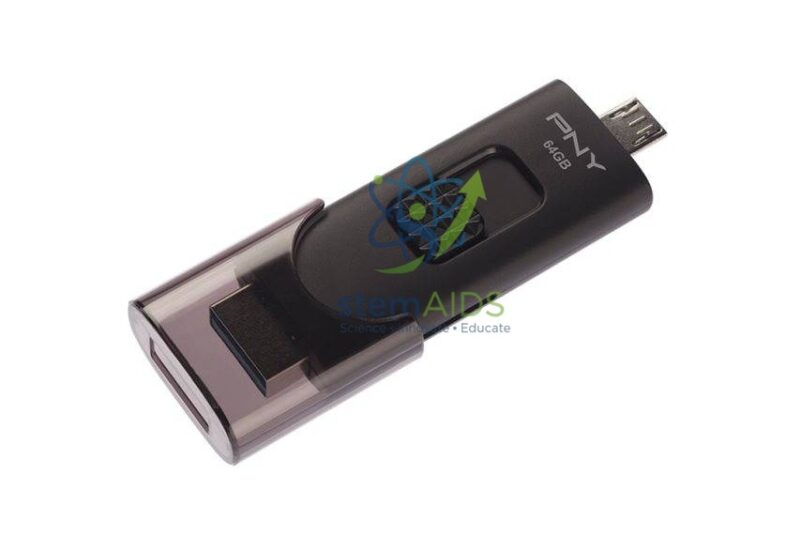
Quick Answer: A dual connector USB key is a flash drive with two plugs: a standard USB-A plug for computers and a smaller plug for phones and tablets. The dual connector USB key in the listing photo has a USB-A plug and a micro USB plug, so files move between a mobile device and a computer without a cloud account or cable.
Two Plugs, One Drive
USB key is another name for a USB flash drive. The photo shows a grey drive with a micro USB plug at one end and a full-size USB-A plug at the other, inside a sliding cover. Dual drives are also made with a USB-C plug in place of micro USB, so check which smaller connector suits your devices; the version and capacity supplied should be confirmed at enquiry.
For the phone or tablet end to work, the device must support USB On-The-Go (OTG), which lets it act as a host and read a drive. Most Android phones and tablets with the matching port support OTG and open the drive in a file manager app. Formatting the drive as exFAT or FAT32 lets both Android and Windows or macOS computers read it.
In schools, dual drives help when pupils record photos, video or data-logging results on tablets during a field trip and need them on a computer for a report, especially where Wi-Fi is limited. For computer-only use, a standard USB 3.0 key is simpler.
Specifications
| Type | Dual connector USB flash drive |
| Connectors pictured | USB-A and micro USB |
| Mobile use | Needs a phone or tablet with USB OTG support |
| Suggested format | exFAT or FAT32 for cross-device use |
| Capacity and connector version | Confirm at enquiry |
Useful For
- Moving field-trip photos from a tablet to a classroom computer
- Backing up phone videos for a media project
- Carrying worksheets to tablets in rooms without Wi-Fi
- Transferring data exported by mobile data-logging apps
Care & Handling
- Close the slide cover when not in use to keep dust out of both plugs.
- Eject the drive in the phone’s or computer’s settings before removing it.
- Keep a second copy of important files; small drives are easily lost.
- Scan the drive with the school’s antivirus before opening files from unknown devices.
Why Choose LabEquip
Teachers and pupils who work across tablets and computers, especially on trips and in rooms with poor Wi-Fi, buy dual drives to move files quickly. Dual drives are listed with other storage items in General Lab Products; send capacities and quantities through the contact page.
Frequently Asked Questions
What does OTG mean?
USB On-The-Go is a feature that lets a phone or tablet act as the host for a USB device such as a flash drive. Without OTG support the phone will not see the drive.
Will it work with an iPhone?
The pictured drive has micro USB and USB-A plugs, which do not fit Lightning ports. Newer iPhones and iPads with USB-C need a drive with a USB-C plug.
Why can’t my computer read files saved from the phone?
The drive may be formatted with a file system one device does not support. exFAT is widely supported by both Android and computers; copy files off before reformatting.
Is a dual drive slower than a normal flash drive?
Speed depends on the memory inside and on the USB version of each port, not on having two plugs. Phone ports and older USB versions often limit transfer speed.
Can pupils use it to hand in work?
Yes, in schools that allow removable media. Scanning drives before opening files and giving each pupil a named drive reduce the risk of lost or infected work.
How do I safely remove it from a phone?
Use the eject or unmount option in the phone’s storage settings or file manager before pulling the drive out, just as on a computer.
Last Updated: September 2026
You must be logged in to post a review.
Bestsellers





Reviews
There are no reviews yet.