
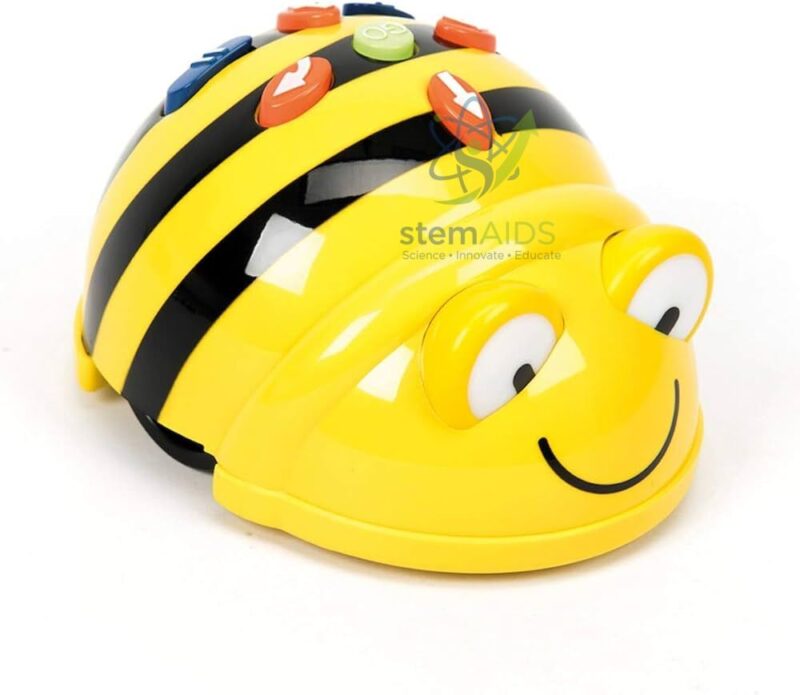
Quick Answer: The Bee-Bot robot is a small bee-shaped programmable floor robot that children program by pressing arrow buttons on its back. Pupils enter a sequence of moves, press GO and watch the robot carry them out, which introduces algorithms, directional language and counting without any screen.
How Button Programming on Bee-Bot Works
The listing describes this as intuitive programming, and that refers to the keypad on the robot itself. Bee-Bot carries forward, backward, left-turn and right-turn arrows plus GO, pause and clear keys. Each forward or backward press adds one step to the robot’s memory, and each turn press adds a quarter turn on the spot. Nothing happens until GO is pressed, so children have to think the whole route through before they see the result.
Because Bee-Bot keeps every command until clear is pressed, a common first-lesson surprise is the robot replaying the previous child’s route before starting the new one. Teaching pupils to press clear first is part of the lesson: it is the robot version of starting a fresh program. When a route goes wrong, the class can debug by predicting where the mistake lies, changing one command and running it again.
No tablet or computer is involved. Schools that later want Bluetooth app control or tile-based coding often add the Blue-Bot with programming bar, which runs on the same grid mats. A themed mat such as the alphabet mat turns the same robot into a phonics or spelling activity.
Specifications
| Type | Programmable floor robot, bee-shaped, yellow and black (as pictured) |
| Programming | Keys on the robot’s back: forward, back, left, right, pause, clear, GO |
| Movement | Fixed-length steps and 90-degree turns; standard Bee-Bot mats use a 15 cm grid |
| Screen or app needed | No |
| Power and charging arrangement | Confirm at enquiry |
Classroom Uses
- Early-years and primary lessons on sequencing, where pupils predict, program and test a short route
- Counting and estimating: how many steps from the start square to a target
- Practising positional and directional words such as forward, backward, left turn and right turn
- Group challenges on themed mats, with one child programming and another checking the route
Care & Handling
- Run Bee-Bot on hard, level floors or on mats; thick carpet pile makes the wheels slip and the steps uneven.
- Switch the robot off after the lesson so it does not drain its power in a drawer.
- Wipe the shell and keys with a slightly damp cloth, and keep water out of the gaps around the keys.
- Do not push the robot along the floor by hand, which strains the drive gears.
Why Choose LabEquip
Bee-Bot is usually bought by nursery and primary schools starting coding in the early years, often several at a time so that small groups each have one. LabEquip lists it in General Lab Products alongside matching mats and accessories; send the number of robots you need through the contact page.
Frequently Asked Questions
What age group is Bee-Bot suited to?
Bee-Bot is aimed at early years and the first years of primary school, when children are learning to count, follow directions and plan a sequence. Older pupils who have mastered it usually move on to app-based or block-coded robots.
How far does Bee-Bot move with one press?
Each forward or backward command moves the robot one step of fixed length, and each turn command rotates it 90 degrees without moving forward. Bee-Bot mats are drawn in squares that match one step, so a press moves the robot one square.
Why does Bee-Bot repeat old moves before my new program?
The robot adds new commands to whatever is already in its memory. Press the clear key before entering a new route, and the robot will run only the commands you have just entered.
Does Bee-Bot need a tablet, app or computer?
No. All programming is done with the keys on its back, which is why it suits very young children and rooms without devices. The Blue-Bot version adds Bluetooth control from an app for schools that want that option.
Can Bee-Bot turn at angles other than 90 degrees?
No. Its turn keys give quarter turns only, so every route is made of straight lines and right angles. That limit is useful for teaching right angles and grid movement.
What surface should Bee-Bot run on?
A smooth, level floor, table or robot mat gives the most even steps. On thick carpet or slopes the steps become shorter or drift sideways, so a route that worked on a mat may miss its target.
Last Updated: September 2026




Reviews
There are no reviews yet.