


In Stock
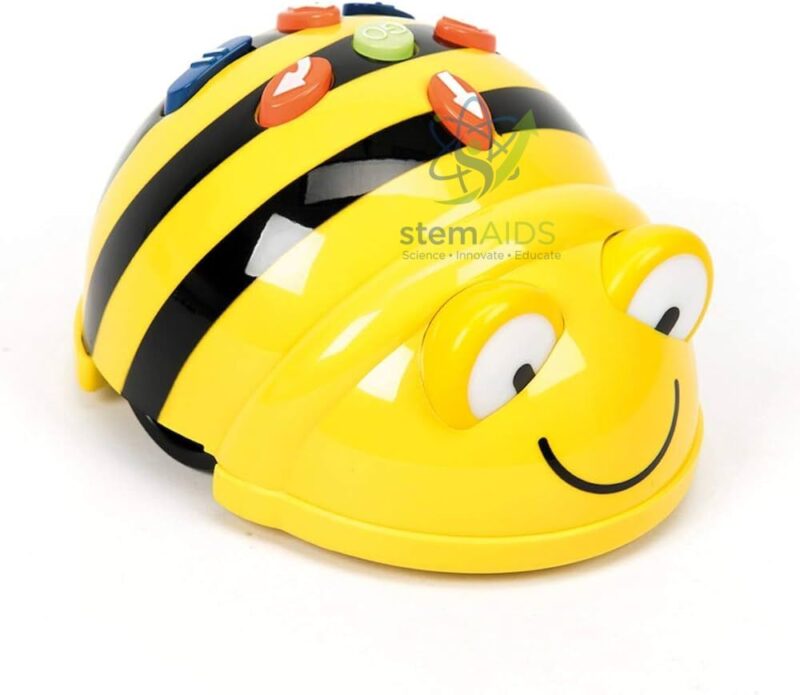
BeeBot robot with intuitive programming
₹1,023.00
The BeeBot Robot with Intuitive Programming by StemAids is an engaging educational robot designed to introduce young learners to the basics of coding, sequencing, direction, movement, logic, and problem-solving. Its simple button-based programming system allows children to create movement commands without using a screen, making it ideal for early STEM education.
This robot helps students understand how instructions are arranged in a sequence. Learners can press directional buttons to move the robot forward, backward, left, or right, then observe how the robot follows the programmed path. This makes abstract coding concepts easier to understand through hands-on classroom activities.
The StemAids BeeBot Robot is suitable for early years, primary classes, coding introductions, numeracy activities, language games, map-based learning, direction practice, and collaborative classroom tasks. Teachers can use it with activity mats, grid layouts, printed cards, classroom maps, number paths, alphabet boards, and storytelling routes.
Key Features
- Screen-free educational robot for early coding and STEM learning
- Simple push-button programming for young learners
- Supports forward, backward, left turn, and right turn movement activities
- Helps teach sequencing, direction, estimation, logic, and problem-solving
- Suitable for classroom grid mats, map activities, number games, and language learning
- Encourages collaborative learning and route-planning exercises
- Ideal for preschool, primary school, STEM labs, and coding workshops
- Useful for introducing computational thinking without complex software
Product Specifications
| Product Name | BeeBot Robot with Intuitive Programming |
|---|---|
| Brand | StemAids |
| Product Type | Educational Programmable Floor Robot |
| Programming Method | Button-based intuitive programming |
| Movement Functions | Forward, backward, left turn, right turn, go, pause, and clear depending on model design |
| Typical Turning Angle | 90-degree left and right turns |
| Typical Step Movement | Approx. 15 cm per forward or backward command, depending on model version |
| Learning Concepts | Coding, Sequencing, Direction, Estimation, Spatial Awareness, Algorithms, Debugging, Problem-Solving |
| Recommended Age Group | Early years and primary learners, commonly suitable for 3 years and above under supervision |
| Recommended Use | Preschool, Primary School, STEM Lab, Coding Class, Robotics Club, Activity-Based Learning |
| Classroom Accessories | Can be used with grid mats, alphabet mats, number mats, map layouts, story cards, and activity sheets |
| Power Source | Rechargeable or battery-operated depending on final supplied model |
| User Level | Beginner / Early Coding Learners |
| Package Note | Final battery type, charging cable, activity mat, storage case, and accessories may vary according to supplied package. Please confirm before purchase. |
How to Use BeeBot Robot with Intuitive Programming
- Charge or Power the Robot: Ensure the BeeBot Robot is fully charged or fitted with the required batteries before classroom use.
- Place on a Flat Surface: Keep the robot on a smooth classroom floor, grid mat, activity mat, or printed learning path.
- Plan the Route: Ask students to decide where the robot should go, such as from one number, letter, picture, or map location to another.
- Enter Commands: Press the directional buttons to create a movement sequence such as forward, forward, right turn, forward, or left turn.
- Press Go: Start the robot and observe how it follows the programmed route.
- Check the Result: If the robot reaches the correct target, discuss the successful sequence. If not, ask students to identify and correct the mistake.
- Clear and Reprogram: Use the clear/reset button before entering a new command sequence.
- Create Advanced Activities: Use story paths, counting tasks, maze challenges, spelling routes, map navigation, and problem-solving games.
Educational Benefits
The StemAids BeeBot Robot with Intuitive Programming supports early computational thinking by helping children understand that a robot follows step-by-step instructions. It develops sequencing skills, direction recognition, spatial awareness, estimation, logical thinking, and debugging ability.
Teachers can use the robot across multiple subjects. In mathematics, students can count steps and estimate distance. In language classes, they can move the robot to letters, words, or story cards. In geography, they can navigate maps. In STEM activities, they can learn basic algorithms, prediction, testing, and correction.
Applications
- Early coding and programming introduction
- STEM classroom activities
- Direction and movement learning
- Sequencing and algorithm practice
- Number, alphabet, and vocabulary games
- Map navigation and geography activities
- Storytelling and route-planning exercises
- Problem-solving and debugging practice
- Collaborative group learning
- Preschool and primary robotics demonstrations
Why Choose StemAids BeeBot Robot with Intuitive Programming?
StemAids provides practical STEM learning products that make coding, robotics, and activity-based education easier for schools. The BeeBot Robot with Intuitive Programming by StemAids is designed for young learners who need a simple, visual, and hands-on way to understand programming concepts.
For schools and training institutions, this robot offers strong classroom value because it does not require advanced coding knowledge, tablets, or complex software for basic activities. It gives teachers a simple tool to introduce sequencing, direction, logic, estimation, collaboration, and computational thinking through engaging play-based learning.
SEO Keywords
BeeBot Robot with Intuitive Programming, StemAids BeeBot Robot, Educational Coding Robot, Programmable Floor Robot, Screen-Free Coding Robot, STEM Robot for Kids, Early Coding Robot, Robotics Toy for Schools, Primary School Coding Robot, BeeBot Style Robot for Classroom.
FAQ
1. What is BeeBot Robot with Intuitive Programming?
It is an educational programmable floor robot designed to introduce young learners to coding, sequencing, direction, movement, and problem-solving through simple button-based commands.
2. Which brand offers this product?
This product is offered under the StemAids brand for STEM education, early coding, robotics learning, and activity-based classroom teaching.
3. Is this robot suitable for beginners?
Yes, it is specially suitable for beginners because students can program the robot using simple directional buttons without needing advanced coding skills.
4. What can students learn from this robot?
Students can learn sequencing, direction, estimation, spatial awareness, logical thinking, basic algorithms, debugging, teamwork, and problem-solving.
5. Does the robot require a computer or tablet?
Basic programming can be done directly through the buttons on the robot. A computer or tablet is not required for simple movement-sequence activities.
6. Can it be used with classroom mats?
Yes, it can be used with grid mats, number mats, alphabet mats, story mats, map mats, and teacher-made activity layouts.
7. Is it suitable for preschool and primary classes?
Yes, it is suitable for preschool and primary learners under teacher supervision, especially for early coding and STEM activities.
8. Can the robot help in non-coding subjects?
Yes, teachers can use it in mathematics, language learning, geography, storytelling, problem-solving, and group activity lessons.
9. What should be checked before purchase?
Buyers should confirm the final model details, power source, charging cable, accessories, activity mats, storage case, warranty, and package contents.
10. How should the robot be maintained?
Keep the robot clean, use it on a flat surface, avoid water exposure, charge or replace batteries as required, and store it safely after classroom use.
You must be logged in to post a review.
Bestsellers




Reviews
There are no reviews yet.