
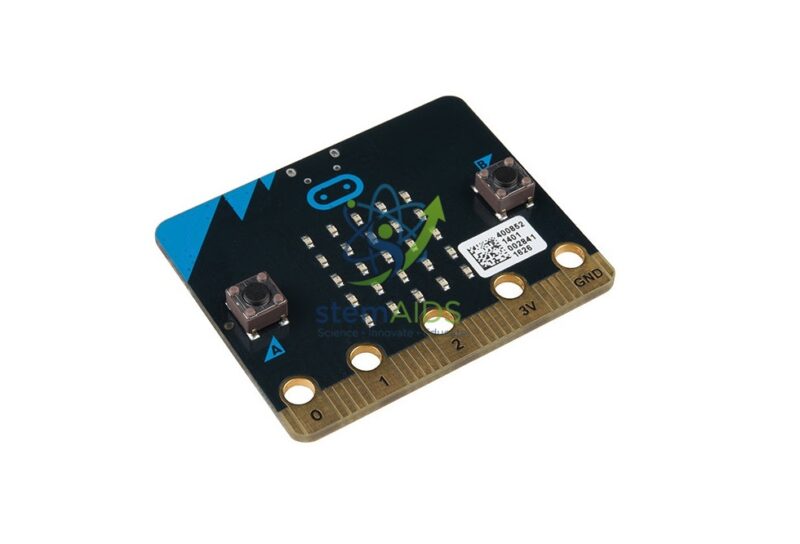
Quick Answer: The Micro:bit v2 Board is the second version of the BBC micro:bit, a pocket-sized programmable circuit board made for teaching computing. It combines a 5 x 5 LED grid, buttons, sensors, a speaker, a microphone and a radio on one board, and students program it in blocks, JavaScript or Python.
What the micro:bit V2 Carries
The front of the board has the LED grid, which can also sense light, two push buttons labelled A and B and a touch-sensitive logo. The back carries the processor, a motion sensor (accelerometer) and compass, a small speaker and a MEMS microphone, with an LED on the front showing when the microphone is active; a temperature reading comes from the processor. A USB socket and a battery connector supply power, and the radio supports both Bluetooth and simple board-to-board messaging.
Along the bottom runs the edge connector, with large rings for crocodile clips and a row of narrower pins. The large rings make first circuits simple, such as a fruit piano using touch inputs, while the full edge connector lets the board slot into expansion boards, robots and Grove shields. That is how one board covers both first lessons and later engineering projects.
Buying boards individually suits schools that already have leads and battery holders, need replacements or want to add boards to kits and robots. For a first class set with power accessories, see the micro:bit V2 beginner pack.
Specifications
| Item | BBC micro:bit, version 2 |
| Outputs | 5 x 5 LED grid, speaker and edge-connector pins |
| Inputs and sensors | Buttons A and B, touch logo, motion sensor, compass, microphone, light and temperature readings |
| Communication | Bluetooth and board-to-board radio; USB |
| Programming | MakeCode (blocks and JavaScript), Python and other supported editors |
| Power | USB, or a battery pack through the battery connector |
Classroom Projects
- Digital dice, compass and step counter using the built-in sensors
- Sound and music projects using the speaker and microphone
- Radio messaging and voting systems across a class set
- Controlling robots, lights and motors through expansion boards
- Logging light, temperature or movement readings for science practicals
Care & Handling
- Touch a grounded object before handling the board in dry weather and store it in its bag to avoid static damage.
- Never connect edge-connector pins to voltages above the board’s own supply; this can destroy the processor.
- Stop crocodile clips from touching two rings at once, which shorts the pins.
- Update the board’s interface firmware when prompted, following the official instructions.
Why Choose LabEquip
Schools buy single boards to build class sets, replace lost or damaged units and fit robots and kits. LabEquip stocks the board in the STEM kits range, together with add-ons such as the Shield Grove micro:bit. For quantities, write through the contact page.
Frequently Asked Questions
How do I know a board is V2?
The V2 has a touch-sensitive logo on the front with a small microphone LED beside it, notches beside the large edge-connector rings and a speaker on the back. The original board has none of these features.
Which programming languages can students use?
Microsoft MakeCode offers blocks and JavaScript, and the micro:bit Python editor uses MicroPython. Other editors, including Scratch through an extension, also support the board. All of them run in a web browser.
Does the board need batteries?
It runs from USB power while connected to a computer. For projects away from the computer, connect a battery pack to the battery socket, commonly two AAA or AA cells, or use a USB power bank.
Can two micro:bit boards talk to each other?
Yes. The radio lets boards send numbers and short text to others set to the same group number. Classes use it for voting, messaging, remote controls and games, with no internet or Bluetooth pairing needed.
What is the edge connector used for?
The large rings take crocodile clips for simple circuits and touch inputs. The full edge connector plugs into expansion boards, Grove shields and robot chassis, which extend the board to motors, servos and extra sensors.
Can the micro:bit log data for science experiments?
The V2 can store logged readings in its own memory, and they appear as a file when the board is connected to a computer. Students record light, temperature, sound or motion over time and open the data in a spreadsheet.
Last Updated: September 2026




Reviews
There are no reviews yet.