
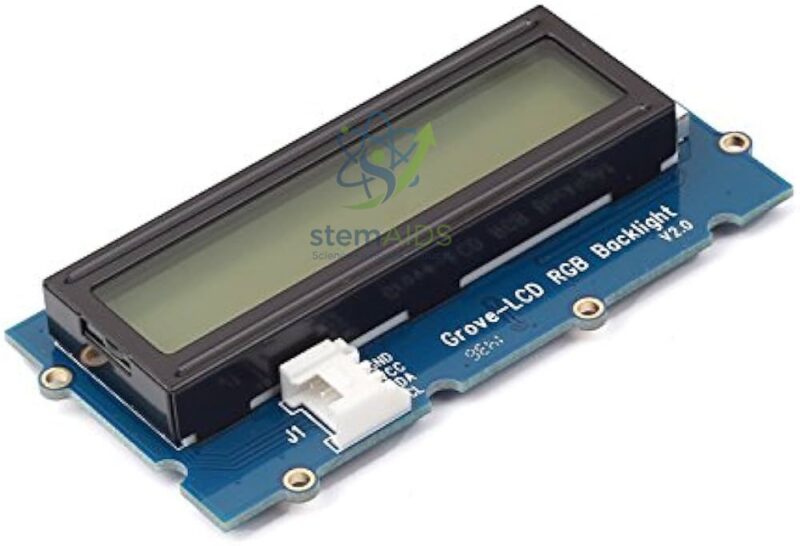
The 16 x 2 LCD format means the display can show 16 characters per line across 2 rows, giving a total display capacity of 32 characters. Grove 16 x 2 LCD modules commonly use an I2C interface, which reduces wiring by using only power and two signal lines: SDA and SCL. This makes the module suitable for beginner-friendly electronics and classroom programming activities.
The StemAids Grove 2 x 16 Characters LCD Display is ideal for school STEM labs, Arduino learning kits, IoT classrooms, robotics labs, smart sensor models, automation projects, weather station displays, timer circuits, data monitoring systems, and student electronics projects.
Key Features
- 16 characters x 2 lines LCD display for clear text output
- Useful for showing sensor values, project status, menus, and warning messages
- I2C interface helps reduce wiring and simplifies project setup
- Grove 4-pin connector for clean and beginner-friendly connection
- Suitable for Arduino, Raspberry Pi, robotics, IoT, and STEM projects
- Ideal for displaying temperature, distance, humidity, light level, and system status
- Useful for school labs, engineering labs, training centers, and electronics project kits
Product Specifications
| Brand | StemAids |
|---|---|
| Product Name | Grove 2 x 16 Characters LCD Display |
| Product Type | Grove-compatible character LCD display module |
| Display Format | 16 characters x 2 lines |
| Total Character Capacity | 32 characters |
| Display Mode | STN character LCD |
| Interface Type | I2C-bus interface |
| Signal Pins | SDA and SCL |
| Power Pins | VCC and GND |
| Operating Voltage | 3.3V / 5V compatible, depending on controller setup |
| Supported Fonts | English and Japanese fonts, depending on LCD library support |
| Compatible Platforms | Arduino, Raspberry Pi with Grove interface, and Grove-compatible microcontroller boards |
| Applications | Sensor display, project status, IoT data output, robotics feedback, and STEM experiments |
How to Use the Grove 2 x 16 Characters LCD Display
- Connect the StemAids Grove 2 x 16 Characters LCD Display to a Grove Base Shield, Grove Base Hat, or compatible I2C expansion board.
- Use a Grove cable to connect the display to the I2C port.
- Check that the GND, VCC, SDA, and SCL lines are connected through the Grove interface.
- Open Arduino IDE, Python environment, or another compatible programming platform.
- Install the required Grove LCD library or compatible I2C LCD library.
- Initialize the display as a 16 x 2 LCD in the program.
- Set the cursor position using code and print text, numbers, or sensor values.
- Use the LCD to display project messages such as temperature, distance, light level, humidity, timer values, or robot status.
Educational Benefits
The StemAids Grove 2 x 16 Characters LCD Display helps students understand visual data output, I2C communication, microcontroller display control, sensor value monitoring, and embedded system interface design. It makes electronics projects more interactive by allowing learners to see real-time project information directly on the display.
Applications
- Arduino LCD display projects
- Raspberry Pi data display experiments
- IoT temperature and humidity display models
- Robotics status display systems
- Sensor value monitoring projects
- Smart home automation display panels
- Mini weather station projects
- Digital timer and counter models
- Menu-based electronics projects
- STEM classroom programming experiments
Why Choose StemAids?
StemAids provides practical STEM, robotics, electronics, and automation learning modules for schools, colleges, training centers, and technical laboratories. The StemAids Grove 2 x 16 Characters LCD Display is designed to make data display experiments simple, reliable, and classroom-friendly. It is a useful module for institutions building Arduino labs, robotics labs, IoT learning spaces, AI labs, and embedded systems training kits.
FAQ
Q1. What is the StemAids Grove 2 x 16 Characters LCD Display used for?
It is used to display text, numbers, sensor values, project status, warnings, menus, and output data in electronics, robotics, STEM, and IoT projects.
Q2. What does 16 x 2 LCD mean?
It means the display has 2 rows and each row can show 16 characters, giving a total of 32 displayable characters.
Q3. Is this LCD display compatible with Arduino?
Yes, it can be used with Arduino through a Grove Base Shield or compatible I2C connection.
Q4. Can this LCD display be used with Raspberry Pi?
Yes, it can be used with Raspberry Pi when connected through compatible Grove interface hardware and suitable user-written code.
Q5. Does this module require complex wiring?
No, the Grove interface reduces wiring and makes classroom use easier by using a simple 4-pin Grove cable.
Q6. What can students display on this LCD?
Students can display temperature, humidity, distance, light level, project status, countdown timers, menu options, sensor alerts, and robot movement messages.
Q7. Is this module suitable for school STEM labs?
Yes, it is suitable for school STEM labs, college electronics labs, Arduino training, robotics projects, IoT classrooms, and beginner-to-intermediate embedded systems learning.
SEO Keywords
Grove 2 x 16 Characters LCD Display, StemAids LCD display module, Grove 16×2 LCD, Arduino LCD display module, Raspberry Pi LCD display, I2C LCD display module, STEM electronics display, robotics LCD module, IoT display module, 16×2 character LCD, electronics lab display module, Grove compatible LCD for students.







Reviews
There are no reviews yet.