






In Stock
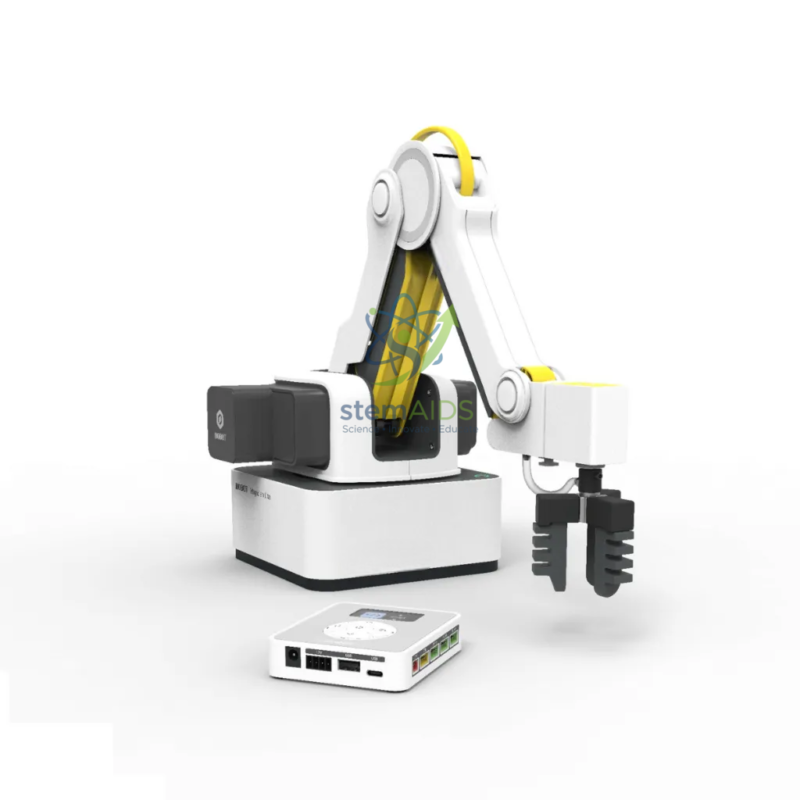
Robot Dobot Magician Bed with Camera Kit
$277.49
Quick Answer: The Robot Dobot Magician Bed with Camera Kit pairs a Dobot Magician-series desktop robot arm with a camera kit for machine vision, so the robot can locate objects from images of its work area. It is used to teach vision-guided pick-and-place in robotics, mechatronics and Industry 4.0 courses.
From Fixed Positions to a Robot That Sees
Most first robot-arm programs use fixed coordinates: the block is always in the same spot, so the arm always goes there. The Robot Dobot Magician Bed with Camera Kit removes that shortcut. A camera looks down on the work area, software finds each object in the image, and the program converts the object’s pixel position into robot coordinates before sending the arm to pick it up.
That conversion is the heart of the lesson. Students calibrate the camera by placing markers at known robot positions, then test how accurately the arm reaches objects scattered at random. Along the way they meet the ideas behind industrial machine-vision cells: lighting that gives consistent contrast, thresholds that separate an object from its background, and recognition by colour, shape or size.
The listing name also contains the word ‘Bed’, which it does not define. It may describe a base for the arm and camera, or be a translated form of the model name Magician Lite, so the exact arm model, the camera and the software included should be confirmed before ordering.
Specifications
| Robot | Dobot Magician-series desktop robot arm |
| Vision | Camera kit for locating objects in the work area |
| Main technique taught | Camera-to-robot calibration and vision-guided pick-and-place |
| Recognition methods | Colour, shape or position, depending on the software used |
| Arm model, ‘Bed’, camera and software | Confirm at enquiry |
Applications
- Sorting mixed blocks by colour or shape when they are scattered rather than lined up
- Hand-eye calibration exercises that map camera pixels to robot coordinates and measure the positioning error
- Simulated quality inspection, where the camera rejects parts with a missing feature or the wrong colour
- Project work in mechatronics and Industry 4.0 modules combining vision, motion and decision logic
Care & Handling
- Fix the camera of the Dobot Magician camera kit firmly once it is calibrated; knocking the mount means repeating the calibration.
- Keep lighting consistent between sessions, since shadows and glare change how the software sees colours and edges.
- Clean the camera lens only with a soft lens cloth, and keep the work area clear of anything the camera might mistake for a part.
- Keep hands out of the arm’s reach while a vision program runs, because the arm moves to wherever the software believes an object is.
Why Choose LabEquip
Vision-guided picking is usually the step colleges and advanced school robotics programmes take after fixed-position work on an arm such as the Dobot Magician Basic Arm. LabEquip lists this camera set-up among its STEM kits; share your course level and the software your students use through the contact page so the configuration can be confirmed with you.
Frequently Asked Questions
What is hand-eye calibration?
It is the process of linking what the camera sees to where the robot moves. Students place a target at several known robot positions, record its pixel coordinates in the image, and the software works out the transformation between the two.
Why does the robot sometimes miss an object the camera found?
Usually because of calibration error, a camera that has moved since calibration, lens distortion near the edges of the image, or an object whose height differs from the calibration surface. Tracking down which cause applies is a useful troubleshooting exercise.
How does lighting affect machine vision?
Colour and edge detection depend on contrast. Uneven light, shadows cast by the arm or glare from shiny parts change the pixel values the software relies on. A plain matt background and steady, diffuse lighting give far more reliable results.
Do students need to write vision code from scratch?
Not at first. Educational robot software normally offers ready-made colour or shape recognition that students configure. More advanced classes can move on to scripting, for example in Python with an open-source vision library.
What does ‘Bed’ in the product name mean?
The listing does not define it. It may describe a base for the arm and camera, or it may be a translated form of the model name Magician Lite. Confirm the exact arm model, camera and software when you enquire, so the set-up matches your lessons.
Which level of student is this suited to?
Upper secondary students in robotics clubs, and college, polytechnic and vocational learners in automation or mechatronics. Students should already be comfortable programming basic arm moves before vision is added.
Last Updated: September 2026
You must be logged in to post a review.
Bestsellers

Sale
Sale
Sale


Reviews
There are no reviews yet.