

In Stock
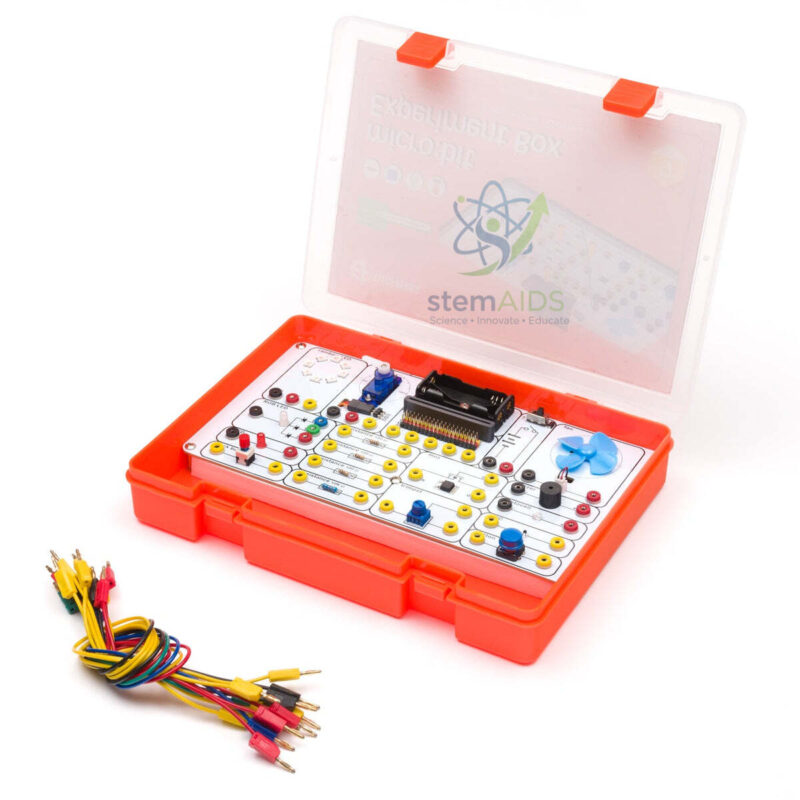
Electronic experimentation kit for micro:bit
$13.87
Quick Answer: The Electronic experimentation kit for micro:bit is a set of electronic parts for running investigations with a BBC micro:bit: students build small circuits, read inputs, drive outputs and measure how components behave under the control of their own code.
Experiments, Not Just Projects
A project ends when the gadget works; an experiment asks why it works and what changes it. This kit is aimed at the second kind of lesson. Students connect a component to the micro:bit, predict what the reading or output will be, measure it, change one variable and measure again. The micro:bit suits this well, because each analog input returns a number from 0 to 1023 that can be logged, graphed and compared.
Investigations that fit a kit of this kind include how a light sensor’s reading changes with distance from a lamp, how a potentiometer divides a voltage, and how the value written to a PWM pin relates to LED brightness. Each one ties a physics idea, such as resistance, voltage division or average power, to code the students wrote themselves. Results can be sent over USB or radio and plotted in the MakeCode data viewer or a spreadsheet.
Kits sold under similar names differ in their parts, so confirm the component list and whether the kit uses breadboard, crocodile-clip or plug-in connections. The listing does not name a board version; check compatibility if your class uses a mix of V1 and V2 boards.
Specifications
| Item | Electronics experimentation kit for BBC micro:bit investigations |
| Controller | BBC micro:bit; version not stated in the listing |
| Analog input range | 0 to 1023 on micro:bit analog pins |
| Data handling | MakeCode data viewer, serial logging or radio |
| Programming | MakeCode blocks, JavaScript or Python |
| Parts and connection system | Confirm at enquiry |
Care & Handling
- Check every circuit before connecting power; a wire from 3V straight to GND can make the board overheat or reset.
- Put a resistor in series with every external LED to limit the current.
- Keep drinks and other liquids away from breadboards and the micro:bit.
- Return components to labelled compartments so missing parts are noticed quickly.
Suggested Investigations
- Light level against distance from a lamp, plotted as a graph
- Voltage division with a potentiometer, compared with calculated values
- PWM value against apparent LED brightness
- Temperature logging over a lesson with readings exported to a spreadsheet
Why Choose LabEquip
Physics and computing teachers who want students to collect data, not only build gadgets, pick this kit. LabEquip lists it in the STEM kits range alongside the Electronic kit for micro:bit V2, which is angled towards controlling outputs. Discuss class sizes through the contact page.
Frequently Asked Questions
What makes this an experimentation kit rather than a project kit?
The emphasis is on measuring and changing variables. Students record readings, alter one thing at a time and explain the result, which builds the same skills as a science practical.
What does an analog reading of 1023 mean?
The micro:bit converts the voltage on an analog pin into a number from 0 to 1023. A reading near 1023 means the pin is close to the supply voltage, and 0 means it is at ground.
Why does an LED need a resistor?
Once an LED conducts, its resistance is very low, so without a resistor too much current flows and the LED can burn out or overload the pin. The resistor limits the current to a safe value.
How can students record data from the micro:bit?
Use the serial write blocks and the MakeCode data viewer while the board is connected by USB, or send values by radio to a second micro:bit. The data can then be downloaded as a file for a spreadsheet.
Does the kit work with micro:bit V1 and V2?
The listing does not name a version. Most basic circuits work on both boards, but check the kit documentation if your class uses a mix.
What parts are in the experimentation kit?
Component lists vary between kits with this name, so the list for this kit should be confirmed at enquiry, together with the connection system it uses.
Last Updated: September 2026
You must be logged in to post a review.
Bestsellers


Sale

Sale

Sale


Reviews
There are no reviews yet.