


In Stock
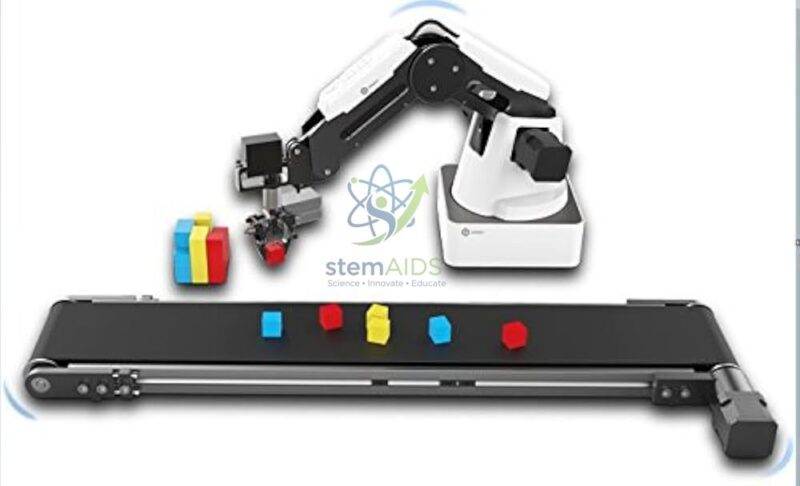
Dobot Conveyor
₹23,050.00
Quick Answer: The Dobot Conveyor is a small motor-driven belt conveyor intended to work beside a Dobot desktop robot arm, carrying blocks or parts to a pick-up point. Schools and training labs use the Dobot conveyor to build desktop sorting and pick-and-place cells that model an automated production line.
How a Conveyor Turns a Robot Arm into a Work Cell
On its own, a desktop robot arm picks up whatever has been placed within its reach. Add the Dobot Conveyor and the task changes: parts now arrive one after another on a moving belt, and the program has to decide when the belt runs, when it stops and when the arm moves in. That is the logic of a real factory cell, reduced to a size that fits on a classroom bench.
The belt motor is usually driven from the robot’s own controller and software, so students set its speed and direction in the same program as the arm. A typical lesson places a sensor near the far end of the belt; when a block arrives the belt halts, the arm lowers its suction cup or gripper, lifts the block and drops it in a bin. Adding a colour sensor turns the same layout into a sorter that sends red, green and blue blocks to different places.
Conveyor packs are sold with different sensor combinations, so confirm which sensors come with this one, and which arm model it pairs with, before planning a colour-sorting scheme of work around it.
Applications
- Colour sorting: blocks travel down the belt, a sensor identifies each colour and the arm places it in the matching bin
- Timing exercises that predict when a block reaches the pick point from belt speed and the distance travelled
- Counting and batching routines that stop the line after a set number of parts has passed
- Introducing Industry 4.0 ideas such as sensor feedback, cycle time and line balancing in engineering and vocational courses
Specifications
| Item | Motor-driven belt conveyor for desktop robot-arm cells |
| Brand | Dobot (as named in the listing) |
| Control | Belt speed and direction set from the robot controller or software (usual arrangement) |
| Typical partner | Dobot desktop robot arm fitted with a suction cup or gripper |
| Sensors supplied and arm compatibility | Confirm at enquiry |
Care & Handling
- Keep the Dobot Conveyor belt clean and dry; dust and sticky label residue make the belt slip and throw off timing.
- Check belt tension and tracking before each session so the belt runs centred on its rollers.
- Keep fingers, hair and sleeves away from the rollers while the belt is powered, and switch off before clearing a jammed part.
- Store the conveyor flat with nothing heavy resting on the belt, so the surface does not take a permanent dent.
Why Choose LabEquip
Robotics clubs and polytechnic automation labs usually add a conveyor once students can already program pick-and-place moves on a fixed table. LabEquip lists this conveyor in its Stem Kits range alongside the Dobot Magician Basic Arm it is designed to work with. Send the arm model you already use through the LabEquip contact page so compatibility can be checked before dispatch.
Frequently Asked Questions
What does a conveyor add to robot arm lessons?
It brings parts to the arm instead of leaving them in fixed positions. Students then have to coordinate two machines: running the belt, detecting a part, stopping at the right moment and triggering the pick. That coordination is the core skill in industrial automation.
How is the belt speed controlled?
The belt motor is normally driven from the robot controller or its software, where a speed value and a direction are set in the program. Slower speeds give a sensor more time to react, which helps on first attempts at sorting.
Do I need sensors to use the conveyor?
Not for basic runs, since the belt can be started and stopped on a timer. For sorting or pick-on-arrival tasks you need at least an object sensor, and a colour sensor for colour sorting. Confirm which sensors come with this conveyor when you enquire.
How can students work out when a block reaches the arm?
Measure the distance from the sensor to the pick point and divide it by the belt speed to get the travel time. The program waits that long after the sensor triggers before stopping the belt. Comparing the prediction with what actually happens is a good lesson in calibration.
Is the conveyor safe for younger students?
The forces are small, but rollers can still pinch fingers or catch hair. Supervise sessions, tie back long hair, keep hands off the belt while it runs and switch it off before removing a stuck part.
Can the conveyor be used without a robot arm?
It can run as a stand-alone belt for timing or counting experiments when a suitable controller drives its motor, but it is designed as part of a robot cell. Most of its teaching value comes from linking it to an arm and sensors.
Last Updated: September 2026
You must be logged in to post a review.
Bestsellers


Sale

Sale
Sale


Reviews
There are no reviews yet.