





In Stock
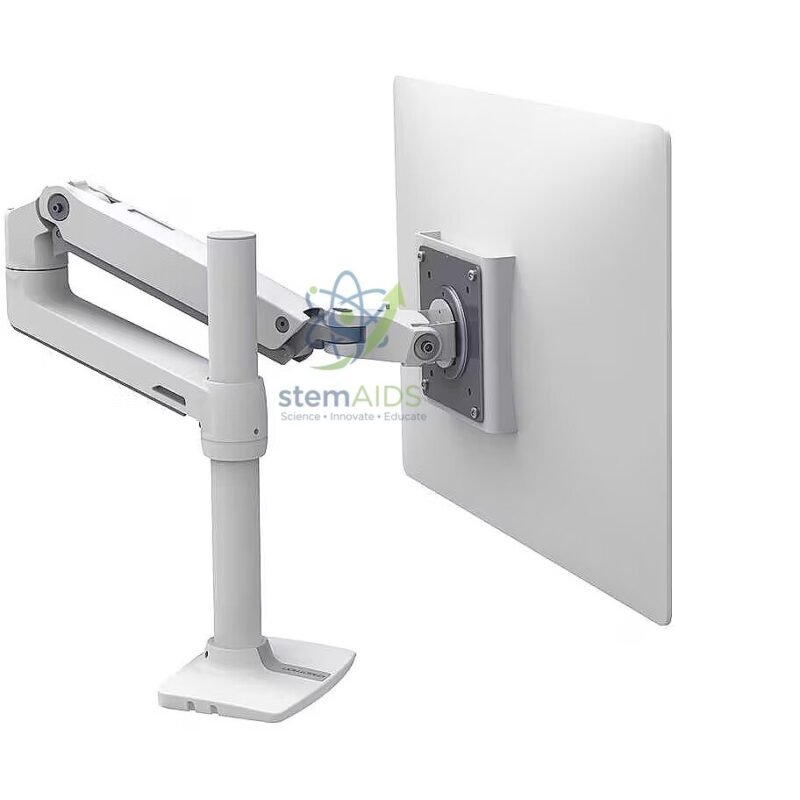
Articulated Arm for Ergonomic Flat Screen
₹18,360.00
Quick Answer: The Articulated Arm for Ergonomic Flat Screen is an adjustable, jointed monitor arm for placing a flat screen at the height, distance and angle that suit the person using it. In schools and colleges it lets shared computer stations be reset for each user, supporting comfortable posture during long coding or design sessions.
Setting a Screen Ergonomically
Ergonomic guidance for screen work generally recommends that the top of the screen sits at or slightly below eye level, at roughly arm’s length, and tilted back a little so the eyes look slightly downward. A fixed monitor stand gets this right for one user at most. An articulated ergonomic arm lets each person move the screen into that position within seconds, then move it back for the next student.
This matters in schools because the same workstation may be used by a younger pupil in one lesson and a tall senior student in the next. Height adjustment reduces neck bending, moving the screen nearer or further brings it to a comfortable focusing distance, and tilt helps cut reflections from windows and ceiling lights. Staff desks and technician stations gain in the same way.
Compared with the plain articulated arm for flat screen, this listing is named for ergonomic adjustment. The exact differences in movement range, height adjustment and supported screen weight between the two listings are not in their titles, so ask LabEquip to confirm them against your screens.
Who Benefits
- Shared computer-lab workstations used by students of different heights
- CAD, design and programming rooms where students work at screens for long periods
- Staff desks and technician workstations used for extended screen work
- Accessible workstations where a user needs the screen at a particular height or angle
Setting Up and Care
- Set the arm’s tension to the weight of the fitted screen so it holds its position without drifting.
- Show students the correct screen position once, then let them adjust it at the start of each session.
- Check clamps and joints each term and re-tighten as needed.
- Keep cables loose enough at the joints to allow full movement.
Specifications
| Item | Articulated monitor arm for ergonomic screen positioning |
| Adjustments | Height, reach, swing and tilt, as typical of ergonomic arms |
| Purpose | Screen at eye level and a comfortable distance for each user |
| Screen fixing | Rear plate for the monitor mounting holes |
| Settings | Shared computer stations, design studios, staff and technician desks |
| Load, screen size range and desk fixing | Confirm at enquiry |
Why Choose LabEquip
Ergonomic arms are typically ordered by schools and colleges fitting out computer rooms, design studios or staff workstations where people sit at screens for long stretches. LabEquip includes the arm in its STEM kits range. To check the fixing and load against your monitors, send the screen models via the contact page.
Frequently Asked Questions
What is the correct height for a computer screen?
A common guideline is to have the top of the screen at or slightly below eye level, so the eyes look slightly down at the centre. The screen should be about an arm’s length away and tilted back slightly. Individual comfort varies, which is why adjustability matters.
How is an ergonomic arm different from a monitor stand?
A stand usually offers limited height and tilt adjustment and sits on the desk. An articulated arm moves the screen up, down, forward, back and sideways, and it leaves the desk surface clear apart from its fixing.
Can the arm reduce glare on the screen?
Yes, by tilting or turning the screen so that reflections from windows and lights move out of the user’s line of sight. Arranging workstations so that screens are side-on to windows also helps.
Is the arm suitable for shared student workstations?
Yes. Once the tension is set for the screen, students can move it to their own position quickly. That is the main advantage in schools, where each workstation is used by many students of different heights during a day.
What does the arm need to hold my screen safely?
The screen’s weight must be within the arm’s rated load, the mounting holes on the back of the screen must match the arm’s plate, and the desk must be strong enough for the clamp or bolt. Check all three before fitting.
How is it different from the plain articulated arm for flat screen?
Both are jointed monitor arms. This listing is named for ergonomic adjustment of height, distance and tilt for each user. The precise differences in movement range and load between the two listings should be confirmed at enquiry.
Last Updated: September 2026
You must be logged in to post a review.
Bestsellers


Sale

Sale

Sale


Reviews
There are no reviews yet.