

In Stock
Wireless Presenter with Laser Pointer
$11.56
Quick Answer: A wireless presenter with laser pointer is a handheld remote that changes slides on a computer from across the room and projects a small laser dot for pointing at the screen. This wireless presenter with laser pointer lets a teacher move around the room instead of standing at the keyboard.
How a Presenter Talks to the Computer
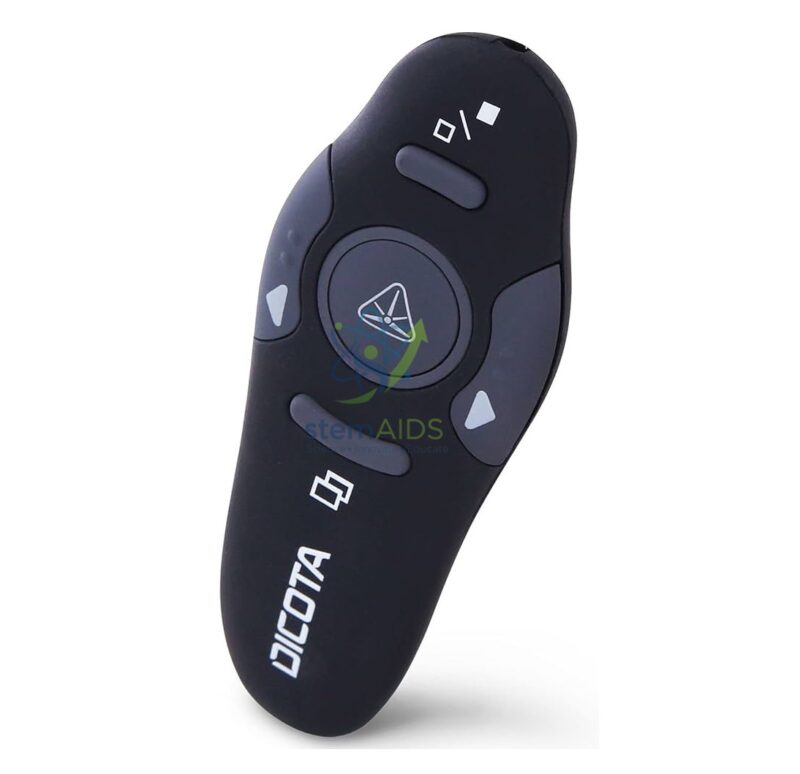
Most wireless presenters come with a small USB receiver that plugs into the computer. The computer treats it like a keyboard, so pressing next or previous sends the same keystrokes as the arrow or page keys, and slide software responds without special drivers. The photo shows a curved black remote with left and right arrow buttons, a round central button and keys above and below it.
The laser is a separate pointing function. A red dot shows up clearly on a projector screen or whiteboard but is hard to see on bright LED panels and interactive displays, where an on-screen highlight or pointer tool is clearer. Receiver type, range and battery type should be confirmed at enquiry.
Laser pointers are not toys. The beam must never be aimed at anyone’s eyes, and the presenter should stay with the teacher rather than be handed to young pupils. It suits rooms with a projector and a screen such as the projection screen in this range.
Specifications
| Type | Handheld wireless slide remote with laser pointer |
| Controls | Left and right slide buttons plus function keys (as pictured) |
| Connection | Wireless link to the computer, usually through a USB receiver |
| Laser | Built-in pointer for projector screens |
| Range, receiver and batteries | Confirm at enquiry |
Who Uses It
- Teachers presenting slides while moving around the class
- Lecturers and trainers in seminar halls
- Older pupils giving project presentations to an audience
- Staff briefings and parent evenings with a projected presentation
Care & Handling
- Never point the laser at people or animals, or at mirrors and shiny surfaces that could reflect it into eyes.
- Keep the USB receiver with the presenter, in its storage slot if it has one, so it is not lost.
- Remove the batteries if the presenter will not be used for several weeks.
- Store it out of reach of young children.
Why Choose LabEquip
Teachers, lecturers and trainers who present often buy a presenter so they can stay near the audience rather than the keyboard. The presenter sits in General Lab Products with other presentation equipment, and orders go through the contact page.
Frequently Asked Questions
Does the presenter need software installed?
Usually not. Most presenters act as a keyboard, so the computer recognises the receiver and slide software responds to the next and previous buttons straight away.
Why can’t I see the laser dot on our interactive panel?
Bright LED and LCD panels overpower a small laser dot, and some screens are coated to reduce reflection. Use the software’s on-screen pointer or highlighter on those displays.
Is the laser safe for classroom use?
Used correctly by an adult, a presentation laser is a pointing aid, but it can harm eyes if shone into them. Never aim it at people, and do not let pupils play with it.
What if the slides do not change?
Check that the receiver is plugged in and the batteries are fresh, and click once in the slide window so it has focus before pressing next.
Can pupils use it for presentations?
Older pupils can use the slide buttons under supervision, with a class rule that only the teacher uses the laser.
Does it work with Mac and Windows computers?
Presenters that act as a standard keyboard generally work with both, and with common slide programs. Extra features such as timers may need the maker’s software.
Last Updated: September 2026
You must be logged in to post a review.
Bestsellers






Reviews
There are no reviews yet.