





In Stock
Visualizer Model MX-P2 ELMO
₹4,260.00
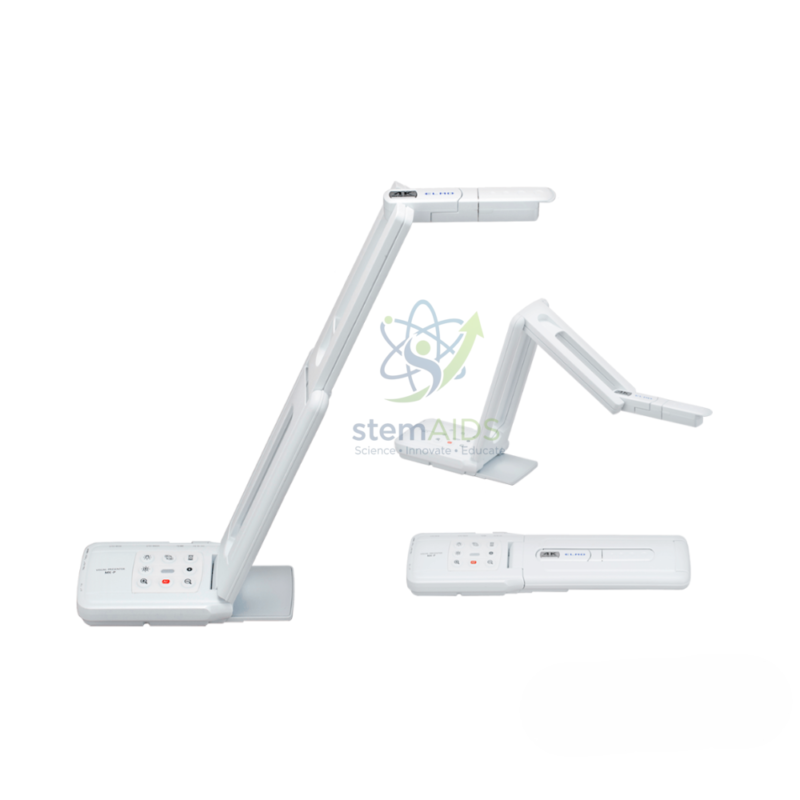
Quick Answer: The Visualizer Model MX-P2 ELMO is a folding document camera from ELMO. As the listing photo shows, the ELMO MX-P2 arm folds down onto its base for carrying and storage, then opens over the desk to display pages, books and objects live on a projector or screen.
Folding Design and Where It Helps
The listing photo shows the camera twice: open, with the arm raised in a zigzag above the base, and folded into a low, flat shape. That flat shape is the point of a folding visualizer. It slips into a drawer or laptop bag, travels safely between the chemistry lab and a classroom, and is less likely to be knocked over when left on a shared desk.
Opened, the jointed arm lets the camera be set higher for a full page or turned to look at the teacher or a whiteboard across the room. A small rectangular item also appears in the photo, possibly a remote control or other accessory, so check what is included when ordering.
Resolution, video outputs and the software used with the MX-P2 are not given in the title. Match them to the display in each room, particularly whether the visualizer will connect directly to a display or through a computer.
Who Uses a Folding Visualizer
- Teachers sharing one visualizer between a lab and a classroom
- Showing a demonstration, then turning the camera to capture a whiteboard
- Exam and revision sessions held in rooms without fixed equipment
- Training days and conferences where the visualizer is packed with a laptop
Care & Handling
- Fold the arm in the sequence shown in the manual; forcing joints in the wrong order strains the hinges.
- Carry the folded unit in a padded case or bag compartment, never with a heavy load pressing on the head.
- Open it on a flat, steady surface before switching on.
- Keep the camera window clean with a blower and a soft cloth.
Specifications
| Brand and model | ELMO MX-P2 |
| Type | Folding document camera / visualizer |
| Arm | Jointed, folds flat onto the base (per listing photo) |
| Finish | White |
| Outputs, resolution and included items | Confirm at enquiry |
Why Choose LabEquip
Folding visualizers such as the MX-P2 are chosen by departments that share equipment between rooms and by trainers who travel. LabEquip lists it in General Lab Products with ELMO’s compact OX-1; send your requirements through the contact page.
Frequently Asked Questions
What is the advantage of a folding visualizer?
It packs flat for storage and carrying, so one unit can serve several rooms. Folded, it is also less likely to be knocked over or damaged on a shared desk.
Can the MX-P2 camera point at the class or the board?
A jointed arm and camera head can usually be turned away from the desk, which lets the camera show a whiteboard or the teacher. Check the head’s rotation range on the data sheet before relying on it.
Is the MX-P2 stable when fully opened?
Folding visualizers are balanced so the base carries the arm’s weight on a flat desk. Keep it away from the desk edge and avoid tugging the cable, which can tip a light unit.
How does it compare with the ELMO OX-1?
Both are ELMO models for teaching. The MX-P2 is shown with a multi-jointed folding arm, while the OX-1 is shown with a slim upright arm on a small base. Choose by portability, arm reach and the connections you need.
What can I show with the MX-P2 in a science lesson?
Pages from a practical manual, a student’s graph, a small specimen in a Petri dish or the scale of a measuring instrument. Keep liquids on a tray below the camera and away from the base.
How do I carry it between rooms?
Fold it fully, pack the cable separately and carry the unit by its base in a padded bag. Unfold it only once it is on the destination desk.
Last Updated: September 2026
You must be logged in to post a review.
Bestsellers





Reviews
There are no reviews yet.