



In Stock
Pico Neo 3
$296.68
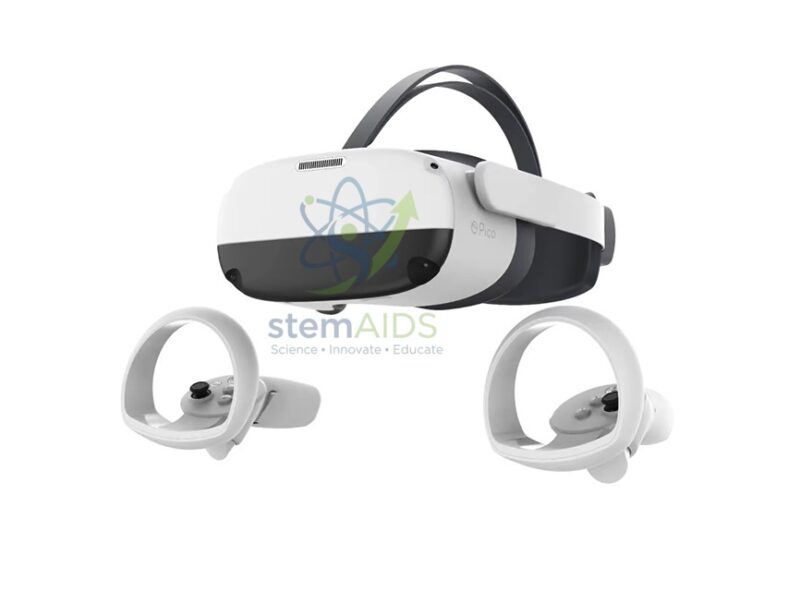
Quick Answer: The Pico Neo 3 is a standalone (all-in-one) virtual reality headset from Pico, pictured with two handheld controllers. It tracks head and hand movement with cameras on the headset itself, so it can run VR lessons and simulations without a PC or external sensors.
What Standalone VR Means
A standalone headset contains its own processor, battery, display and storage, so learners put it on and start an app with no cable to a computer. Cameras on the front of the headset watch the room and the controllers, which is called inside-out tracking: the wearer can turn, lean and step within a marked play area, and the controllers appear as hands or tools in the virtual scene. The photo shows the white headset with its head strap and two ring-topped controllers.
Pico Neo 3 has been sold in more than one version, including the Neo 3 Link, which can also be cabled to a VR-ready PC to run PC VR software, and versions aimed at business and education. Which version, storage size and accessories are supplied should be confirmed at enquiry, together with the app store and content available in your country.
Compared with the PC-based HTC Vive Pro 2 kit, a standalone headset is quicker to set up and easier to move between rooms, while PC VR can run heavier simulations. Standalone headsets are often preferred for class use because no computer has to be prepared for each wearer.
Specifications
| Type | Standalone (all-in-one) VR headset |
| Controllers | Two handheld controllers (as pictured) |
| Tracking | Inside-out, from cameras on the headset |
| PC required | No, for standalone use |
| Version, storage and content platform | Confirm at enquiry |
Uses in Education and Training
- Virtual field trips to places pupils cannot visit
- Exploring 3D models of cells, molecules, organs or machines
- Safety and procedure training in a simulated workshop or lab
- Design and media courses that build and test VR scenes
Care & Handling
- Never leave the headset where sunlight can shine into the lenses, which can focus it onto the displays and damage them.
- Clean lenses only with a dry microfibre cloth, and clean the face cushion with wipes suited to its material between users.
- Set up a clear play area and a supervisor for each wearer, and keep sessions short for new users.
- Check the manufacturer’s age guidance before using the headset with younger pupils.
Why Choose LabEquip
Schools, colleges and training centres choose standalone VR when they want immersive lessons without a room of gaming PCs. LabEquip lists the Pico Neo 3 in General Lab Products; send the number of headsets and the content you plan to use through the contact page.
Frequently Asked Questions
Does the Pico Neo 3 need a computer?
No. It runs apps on the headset itself. Some versions can also connect to a VR-ready PC by cable, but that is optional.
What is inside-out tracking?
Cameras on the headset track the room and the controllers, so no sensors need to be mounted on walls. It makes the headset quick to set up in a different room.
How many learners can use one headset at a time?
One wearer at a time. Where the headset’s casting feature is available, teachers show the wearer’s view on a screen so the rest of the group can follow and discuss it.
Is VR suitable for young children?
Headset makers publish minimum age guidance, and schools should follow it. Keep sessions short, supervise every wearer and stop if anyone feels dizzy or uncomfortable.
How should the headset be cleaned between users?
Wipe the face cushion and straps with suitable wipes, clean the lenses only with a dry microfibre cloth, and let everything dry before the next user.
Why must the lenses stay out of sunlight?
VR lenses act like magnifying glasses. Sunlight falling on them is concentrated onto the screens and can permanently damage them, so store the headset in a box or with the lenses covered.
Last Updated: September 2026
You must be logged in to post a review.
Bestsellers





Reviews
There are no reviews yet.