





In Stock
Document camera Model SPE-VI-51 SPEECHI
₹1,652.00
Quick Answer: The Document camera Model SPE-VI-51 SPEECHI is a classroom document camera from Speechi, the French educational technology company. The Speechi SPE-VI-51 captures books, student work and small objects from above and sends the live image to a projector, display or computer.
Sharing Student Work with the SPE-VI-51
One of the most practical uses of a document camera is putting a student’s own work in front of the class within seconds. The teacher slides an exercise book under the camera, the class sees it, and discussion turns to what makes an answer strong or incomplete. Folding back the name first keeps the exercise about the work rather than the student.
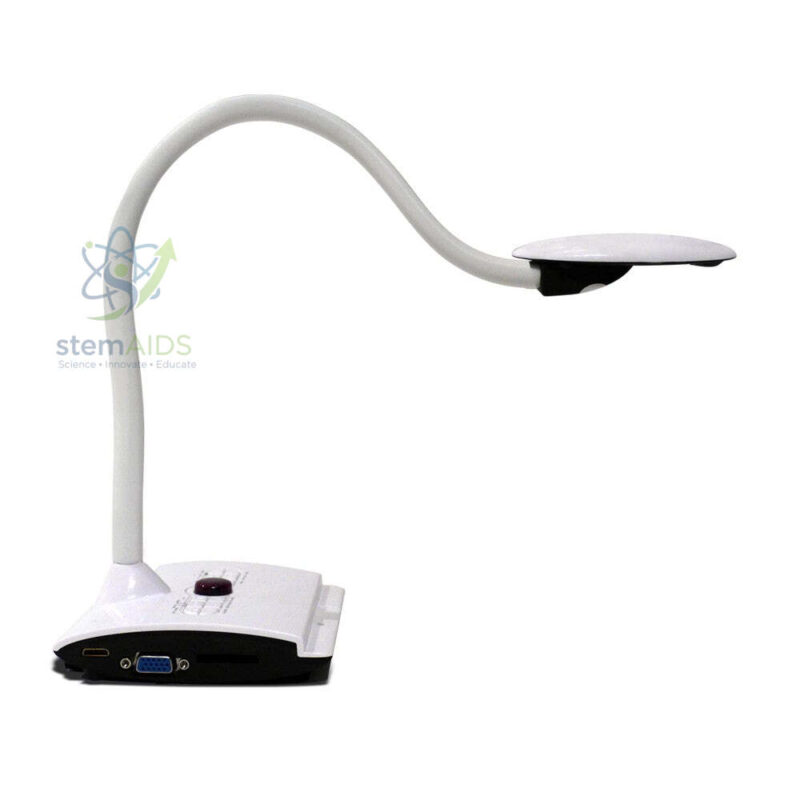
The listing photo for this model shows a white flexible gooseneck on a base, but the image file carries the name of the related SPE-VI-102, so the picture may not show this exact model. Because the two listings share a photo, camera resolution, outputs and controls should be compared on each model’s current data sheet.
Document cameras spare the teacher from photocopying or scanning an item before showing it. Anything that fits under the head can be displayed at once, including handwritten notes, a textbook diagram or a freshly completed practical record.
Applications
- Peer assessment, showing an anonymised answer and discussing it against the mark scheme
- Walking a class through an exam paper question by question on the big screen
- Displaying a practical record or graph drawn in a lab notebook
- Showing small objects, such as coins, fossils or electronic components, enlarged for the class
Specifications
| Brand and model | Speechi SPE-VI-51 |
| Type | Classroom document camera |
| Displays | Pages, handwritten work and small 3D objects |
| Arm style | Gooseneck shown in the listing photo (image shared with SPE-VI-102) |
| Resolution, outputs and included software | Confirm at enquiry |
Care & Handling
- Position the camera head before switching on, so the focus system has a steady subject when it starts.
- Never lift or carry the unit by its gooseneck; support it by the base.
- Keep the base’s buttons and ports free of dust with a dry brush, and cover the unit if the room is being painted or drilled.
- Update firmware or software only from the brand’s official sources.
Why Choose LabEquip
Schools already using Speechi interactive equipment often choose a document camera from the same brand to keep support in one place. LabEquip lists the SPE-VI-51 in General Lab Products beside the SPE-VI-102; tell us through the contact page which displays the camera will connect to.
Frequently Asked Questions
Who makes the SPE-VI-51?
It is sold under the Speechi brand, a French company that supplies classroom technology such as interactive displays and document cameras. LabEquip also lists the SPE-VI-102 from the same range.
How is the SPE-VI-51 different from the SPE-VI-102?
They are separate models in Speechi’s document camera range. The listing gives no detailed specification for either, and both currently show the same photo, so compare the data sheets for camera resolution, connections and arm design before choosing.
Can a document camera replace a scanner?
For classroom display, yes: the page is shown live without scanning. Many document cameras can also save a still image, which is quick for capturing work, though a flatbed scanner still gives flatter, more even copies for printing.
How do I show student work without embarrassing the student?
Cover or fold back the name, ask permission where appropriate and keep comments on specific features of the work. Showing two answers side by side, one strong and one developing, keeps the discussion about the method.
Does the camera work with an interactive display?
Document cameras connect to displays either directly through a video output or through a computer by USB. Check which connection this model uses and whether your display has a matching input.
Why does the image flicker under classroom lights?
Some fluorescent and LED lights flicker at a rate the camera picks up. Setting the camera’s anti-flicker or power-line frequency option to match the local mains frequency, 50 Hz in India, usually removes it.
Last Updated: September 2026
You must be logged in to post a review.
Bestsellers




Reviews
There are no reviews yet.