


In Stock
CPU Support
$29.67
Quick Answer: The CPU Support is an under-desk CPU holder: a metal cradle fixed beneath a worktop that holds a desktop computer tower off the floor. The listing name follows the French support pour unité centrale; in English it is usually called a CPU holder or CPU mount.
Why Lift a Computer Tower off the Floor
A tower left on the floor of a computer lab collects dust through its fans, gets kicked by chairs and feet, and is the first thing to suffer if a floor is mopped or a pipe leaks. Hanging the case under the desk top keeps the ports and power button within reach while freeing floor space for legs and bags.
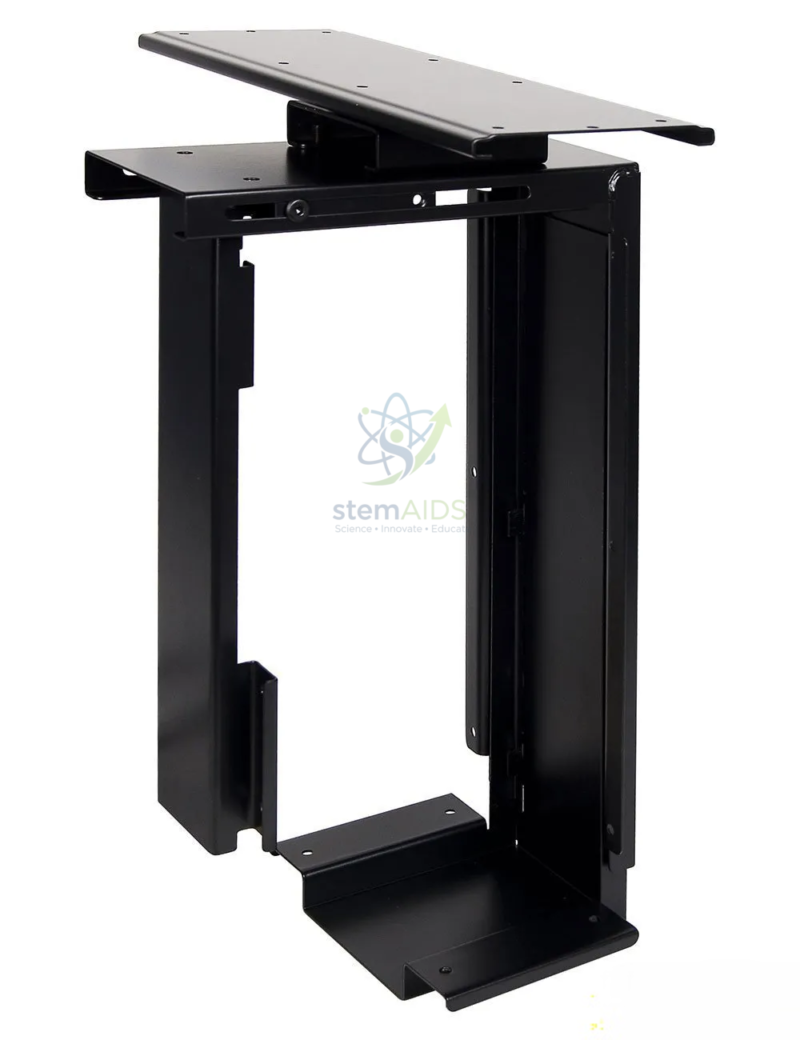
The listing photo shows a black metal holder with a top plate that screws under the desk and a frame whose base cradles the tower, which stands upright inside it with its front panel facing out. The width range, the maximum load and whether the holder can swivel or slide are not stated.
For a lab with many identical PCs, holders also make cable routing tidier, as power and network leads run up to the desk instead of across the floor.
Applications
- Computer labs and ICT rooms with rows of desktop PCs
- Staff workstations and library terminals with little floor space
- Science labs where a data-logging PC sits near wet benches and must stay off the floor
- Office or reception desks where the tower should be out of sight but reachable
Specifications
| Type | Under-desk holder for a desktop computer tower |
| Material | Metal frame, black finish (per listing photo) |
| Mounting | Screwed to the underside of the worktop |
| Tower position | Upright, front panel facing out |
| Width range and load limit | Confirm at enquiry |
Care & Handling
- Fix the holder into a solid worktop thick enough to take the screws securely; chipboard close to the front edge of a desk can split.
- Keep a gap at the back and sides of the case so its fans can draw air, and do not box a tower in against a panel.
- Check the fixing screws once a term in busy labs, as repeated knocks can loosen them.
- Leave enough cable slack that the tower can be lifted out for service without straining the plugs.
Why Choose LabEquip
ICT coordinators and facilities teams order CPU holders in sets when furnishing or refitting a computer lab. LabEquip lists this holder in General Lab Products; send the number of workstations and your case sizes through the contact page.
Frequently Asked Questions
What is a CPU support?
It is another name for a CPU holder, a bracket that holds a desktop computer tower. The term comes from the French support pour unité centrale. This one fixes under a desk so the tower hangs above the floor.
Will it fit my computer case?
It is made for upright desktop towers. Measure the width and depth of your cases and compare them with the holder’s adjustment range and load limit; very large workstation cases may need a floor stand instead.
Does hanging the tower under the desk affect cooling?
Not if air can move freely. Leave the vents at the front, back and top of the case uncovered and keep a small gap between the case and any modesty panel.
How is the holder installed?
It is screwed to the underside of the worktop through its top plate. Use screws long enough to grip well without passing through the desk surface, and fix the holder where the tower will not hit knees or chair arms.
Can the tower be removed easily for repairs?
Yes. Disconnect the cables, loosen any strap or adjustment holding the case and lift it out of the cradle. Labelling cables before removal makes reconnection quicker in a lab full of identical PCs.
Is it better than a floor stand with wheels?
An under-desk holder keeps the floor completely clear for cleaning and legs. A wheeled floor stand is easier to install and suits heavier cases, but it still sits where feet go.
Last Updated: September 2026
You must be logged in to post a review.
Bestsellers




Reviews
There are no reviews yet.